 Pachat.ai
OpenClaw Subagents: What They Are and How to Spawn Them
Updated 2026-11
TL;DR: OpenClaw subagents are background agent runs that your main agent spawns from an existing run; each works in its own session and announces its result back when it finishes. The OpenClaw docs, checked on 2026-11-25, list the defaults as nesting depth 5, up to 5 active children per session and 8 concurrent child runs. Use them to split research and slow tool work off the main chat, and keep one main agent in charge of checking what comes back.
What Are OpenClaw Subagents?
OpenClaw subagents are helper runs your main agent starts so the main conversation can keep going. The official subagents page, read on 2026-11-25, defines them as "background agent runs spawned from an existing agent run." Each one runs in its own session, keeps its own context by default, and announces its result back to the requester for review. The docs name three goals: parallelize research, long tasks and slow tool work; keep children isolated; and keep the tool surface hard to misuse, so subagents do not get session or message tools by default.
Subagents are smaller AI agents that your main agent can spin up and delegate tasks to. So instead of one big agent trying to do everything, you have a team of specialized agents working in parallel.
It's like going from a solopreneur to having a whole team overnight. And the fact that they're on by default now is a big deal. It means when you build a workflow in OpenClaw, it can automatically create and manage these sub agents without you having to manually configure it. You don't need to be a developer, you just build your workflow and OpenClaw handles the orchestration in the background.
A subagent is not the same as a second permanent agent. A new permanent agent gets its own workspace and settings; a subagent is a run that starts, does its job and ends, while the main agent stays your point of contact. For the permanent kind, see how to use OpenClaw.
How to Spawn OpenClaw Subagents From Chat
The fastest way to use OpenClaw subagents is to ask for one in the middle of a conversation. Since the February 2026 release 2026.2.17, a creator walkthrough on 2026-02-20 showed that you can spawn sub agents right from chat, including from Slack and Telegram. Under the hood, the docs list three tools for this, sessions_spawn, sessions_yield and subagents, plus a /subagents slash command to inspect runs. In the Control UI, you open Subagents from the parent conversation to see child runs under Running and Finished.
Now you can spawn sub agents directly from the chat window. You are mid conversation, you need a task handled, you call a sub agent, it goes and does the work, it comes back with the result and your main conversation keeps going.
Say you are in a strategy session inside OpenClaw, planning content. You say: spawn a sub agent, go and research the top 5 questions people are asking about AI automation on Reddit and YouTube comments right now. Bring back the findings.
While that is running, you keep working on something else. Then the sub agent reports back and you feed those findings straight into your content plan.
You delegate things, run in parallel, you get more done in less time.
This is how high output teams work. And now you can do that inside a single chat window without switching tools.
| Habit | Why it helps |
|---|---|
| One task per child, with a clear output such as "5 questions with links" | The result is easy to check when it comes back |
context: "fork" only when the child needs your current transcript | Otherwise the child starts clean |
| Start child work once, then wait for the completion event | The docs advise against poll loops |
OpenClaw Subagent Limits: Depth, Children and Concurrency
OpenClaw subagent limits are config settings that you can tune. The nested sub-agents page, checked on 2026-11-25, says subagents can recursively delegate through depth 5 by default, with maxSpawnDepth set anywhere from 1 to 5. A separate admission limit, maxChildrenPerAgent, allows 5 active children per session by default, and maxConcurrent allows 8 concurrent child runs per spawning session. Results flow back one level at a time: a child announces to its direct parent, the parent combines its children, and the main agent delivers to you.
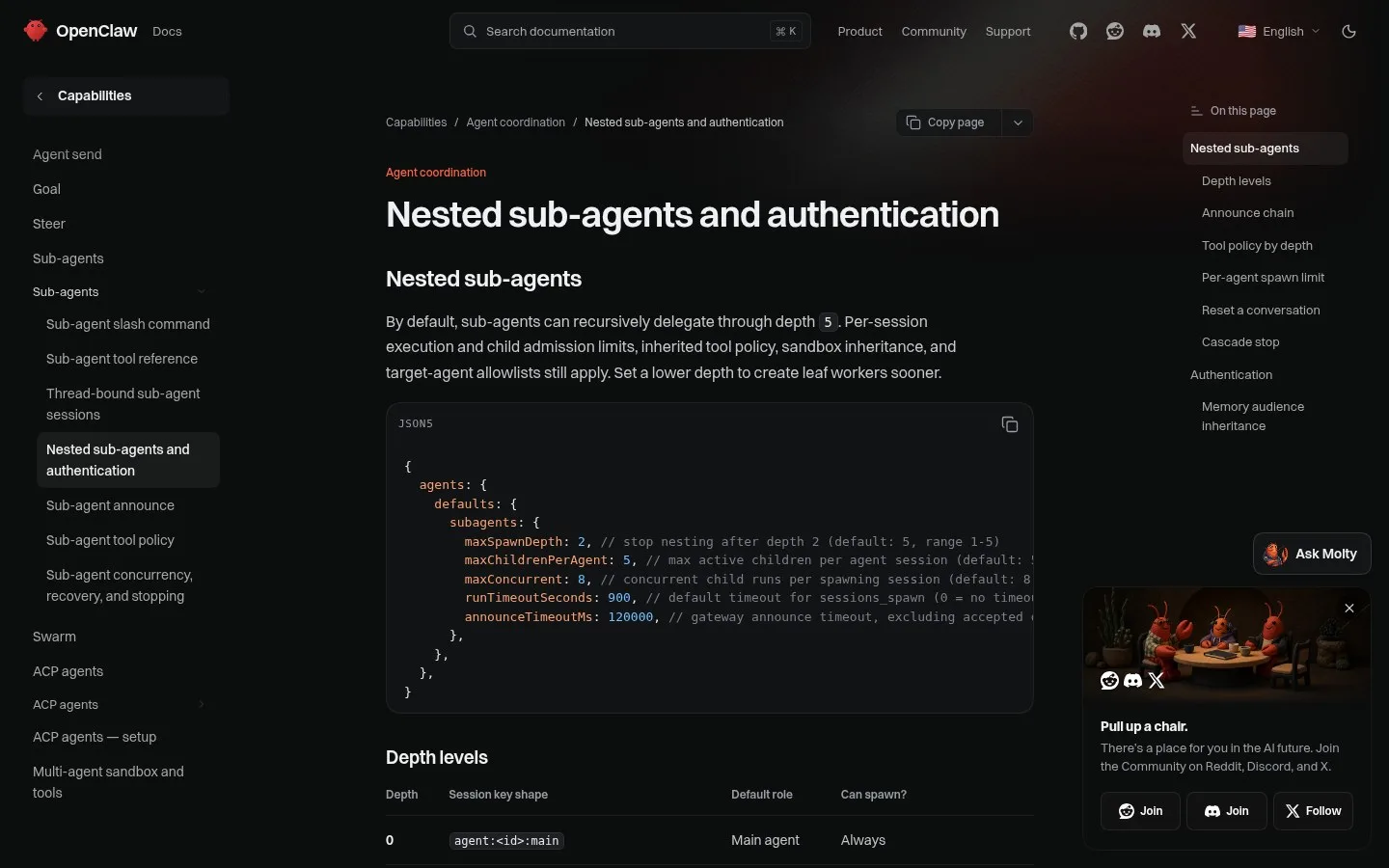
Screenshot of the Nested sub-agents page in the OpenClaw docs, 2026-11-25.
Setting (agents.defaults.subagents) | Default in the docs | What it controls |
|---|---|---|
maxSpawnDepth | 5 (range 1-5) | How many levels a child can delegate down |
maxChildrenPerAgent | 5 (range 1-20) | Active children one session can hold |
maxConcurrent | 8 | Child runs executing at the same time per session |
runTimeoutSeconds | example value 900 | Default timeout for sessions_spawn |
These limits matter because early versions were rough. A February 2026 update overhauled the entire way OpenClaw sends and manages messages through sub agents, the little helper AI workers that run tasks for you behind the scenes. Before this update, those helpers could get lost, drop messages or just freeze up. Now they work like a proper assembly line, step by step, no messages falling through the cracks. On top of that, they lock the whole thing down, with a bunch of security fixes in one single update. It has also become, as it's expanded, more buggy, so check the change log and make sure OpenClaw is running the new version.
Separate logins also matter. When one builder added a customer service bot on a VPS in April 2026, the setup asked whether to copy all the settings and the authorization from the main agent. The answer was no: you want your main agent to have its own authorization permissions and then have your sub agents have their separate authorization permissions.
If you just want an agent for research, it does not need privileged logins. Use an API so that way it doesn't need to log into any proprietary information, and doesn't need to log in to have any privilege access to any of your accounts. It just goes on the internet. If you want your agent to get access to Google tools like Gmail, your Google Docs and Google Drive, Google auth is the way, because of authentication.
Real Ways People Use OpenClaw Subagents
A working subagent setup is one where every subagent has one narrow job and one main agent stays on top. In a February 2026 demo, a builder ran 8 subagents, each on its own cloud computer, all under one main OpenClaw. The idea was to have it spawn sub agents with their own computers so that they can go to Upwork and find jobs that are AI automation jobs, then build them out before applying. The creator's own description of the scale: "This is at a scale of just 8 total."
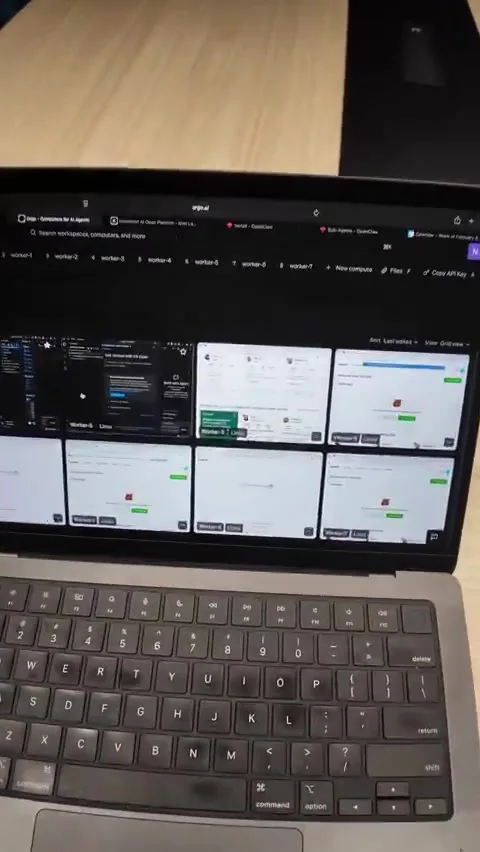
Frame from an @nickvasilescu video showing 8 worker computers on Orgo, February 2026.
You have a main OpenClaw, and then have it spawn sub agents with their own computers. It's finding the jobs and then building, building them out before you even apply to them. You can see all the files. The skill gives your OpenClaw access to the sub agents so that the sub agents have their own computer, and they're all running under this OpenClaw. So it's like one OpenClaw. You don't have to install it into these other computers and it spawns the sub agents into their own computers. It's really cool to watch how they're looking at all the different jobs and building them out live.
A real estate operator described a similar pattern in February 2026, by his own account: his assistant was spinning 10 sub agents to audit his entire website, scraping competitor websites and matching high activity leads to listings, "tasks that used to take me eight hours." In his words, the assistant and its subagents "finished them in 60 minutes." The assistant is an OpenClaw running 24/7 on an isolated dedicated Mac mini. It's so powerful he won't even install it on his main laptop. Safety first.
Another common pattern is a trigger plus helpers. A March 2026 walkthrough of release 2026.3.2 described onboarding: your main agent handles the trigger, it detects a new sign up, then it spins up sub agents to handle separate tasks. One sub agent sends a personalized welcome message. Another adds the member to the right channels. Another pulls their profile data and tags them correctly in your CRM. Another sends them a curated starter guide based on what they said they needed help with. All of that happens simultaneously, subagents running in parallel. What used to take a team of people doing manual work is now one automated workflow.
Some builders mix harnesses. As one put it in May 2026, Hermes is more of a main agent that spawns sub agents underneath it, which you can do with OpenClaw as well. It has some advantages, memory being one of them. But each of them have pretty easy install instructions and pretty easy to get up and going. You can actually run a Hermes agent alongside OpenClaw and have OpenClaw use the Hermes agent. But if you want to have multiple Hermes agents under OpenClaw, it's going to be a little bit more of a different process to get them to work with each other, because you have to have individual containers for each one. When should you use one over the other? It's really up to your preference and really up to what you're trying to do. The appeal is the idea of having an orchestrator and then a power agent that can spawn other sub agents.
For the same idea in a coding tool, compare Claude Code subagents and other AI agent orchestration tools.
When OpenClaw Subagents Are Worth It
OpenClaw subagents are worth it when the work splits into parts that do not need each other's context. Research, scraping, long tool calls and independent drafts are good fits, because each child can finish and report without waiting on the others. In November 2026, the docs also suggest a different model for subagents through agents.defaults.subagents.model, so a heavy main agent can hand repetitive steps to a lighter worker. Work that needs one shared train of thought, such as a single tricky decision, usually belongs in the main session.
| Keep in the main agent | Send to subagents |
|---|---|
| The decision and the final answer | Research, scraping and gathering |
| Anything that needs the whole conversation | Independent drafts and checks |
| Reviewing what comes back | Slow tool calls |
Reviewing is where most setups slip. In the February 2026 real estate example, the owner's report was blunt: last night, he didn't finish the plan, 25 blogs. He only completed 18. When asked why, he said he was just being lazy. Then he said they'd work better together if the owner was nicer. A child that announces "done" can still be wrong, and with 8 children running, nobody reads every transcript. A proactive agent that checks in on its own is covered in OpenClaw heartbeat.
Check Your Subagents' Results With Pachat
A second set of eyes on the final answer is the simplest safety net for a subagent setup. Pachat is a web product at pachat.ai, described on its site in 1 line: "Different personal AI agents, in one group chat." As of November 2026, it gives you a place to test what your OpenClaw subagents brought back, before you act on it. For how people run several agents in one room, see How People Use Multi-Agent Group Chats.
- Copy the combined result your main agent delivered.
- Open pachat.ai and put your Claude, Grok Bot, Muse and ChatGPT dots in one group chat.
- Paste the result and ask what is missing or wrong. They check each other's facts and argue it out, then you make the call.
The pachat.ai homepage, November 2026.
FAQ
What is a subagent in OpenClaw?
A subagent is a background agent run that your main agent spawns from an existing run. The OpenClaw docs, checked on 2026-11-25, say each one runs in its own session, keeps its own context by default and announces its result back to the requester for review. Subagents do not get session or message tools by default. They are meant for research, long tasks and slow tool work that would otherwise block your main chat.
How do I spawn a subagent in OpenClaw?
Ask your main agent to spawn one in chat, for example "spawn a sub agent to research these 5 questions and bring back links." A creator walkthrough of release 2026.2.17, posted on 2026-02-20, showed this working from the chat window. Under the hood the agent uses the sessions_spawn tool, and you can inspect runs with the /subagents command or the Subagents panel in the Control UI.
How many subagents can OpenClaw run at once?
The OpenClaw docs, checked on 2026-11-25, set maxConcurrent to 8 concurrent child runs per spawning session and maxChildrenPerAgent to 5 active children per session by default. The children limit can go from 1 to 20 in config. Raising concurrency does not raise the children limit, so change both if you need a bigger fan-out. Each independent session has its own budget.
Can OpenClaw subagents spawn their own subagents?
Yes. According to the nested sub-agents page checked on 2026-11-25, subagents can recursively delegate through depth 5 by default, and you can lower maxSpawnDepth to anything from 1 to 5 to create leaf workers sooner. Results travel back one level at a time: each parent only sees announces from its direct children, combines them, and passes one result upward to the main agent.
What is the difference between OpenClaw subagents and multiple agents?
Multiple agents are permanent, each with its own workspace, settings and chat history, and you add them with openclaw agents add. Subagents are temporary runs that a parent spawns for one task, then end. In 2026 setups, people often combine both: 1 permanent main agent, a few permanent specialists, and short-lived subagents for research and checks. Pick subagents when the job is one-off and parallel.
Can Pachat review what my OpenClaw subagents produce?
Yes. Pachat is a web product at pachat.ai: "Different personal AI agents, in one group chat." Copy 1 result from your main agent, such as a research summary, then put your Claude, Grok Bot, Muse and ChatGPT dots in one group chat and paste it in. They check each other's facts and argue it out, then you make the call. It runs in the browser, so you do not change your OpenClaw setup.
Want a second opinion on what your subagents found? Try pachat.ai.
References
- Sub-agents, OpenClaw Docs, fetched 2026-11-25
- Nested sub-agents and authentication, OpenClaw Docs, fetched 2026-11-25
- Sub-agent concurrency, recovery, and stopping, OpenClaw Docs, fetched 2026-11-25
- @nickvasilescu, X, 2026-02-11
- @Riz, X, 2026-04-16
- @natepac, X, 2026-05-14
- @SEOMastery2026, X, 2026-03-05
- @JulianGoldieSEO, X, 2026-02-26
- @aiseomastery, X, 2026-02-20
- @dustinmfox, X, 2026-02-02