 Pachat.ai

Claude Code Routines: How to Run Claude Code on a Schedule
Updated 2026-11
TL;DR: Claude Code routines, now called cloud scheduled tasks, are saved Claude Code sessions that run on Anthropic's cloud on a schedule, from an API call or on a GitHub event. You create one with /schedule or at claude.ai/code/routines, and it keeps working when your laptop is closed. For quick repeats inside an open session, use /loop instead.
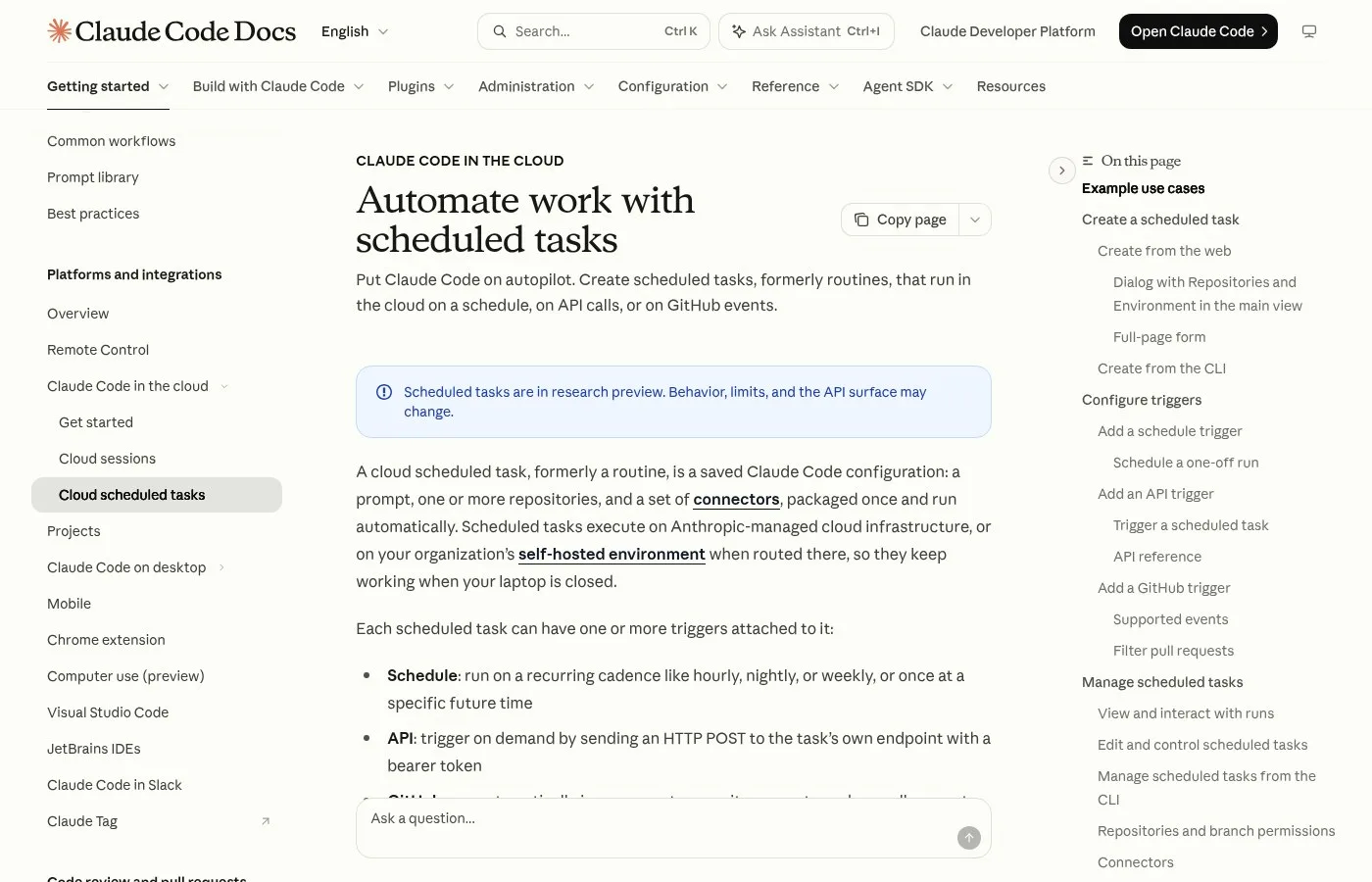
Screenshot of the scheduled tasks (formerly routines) page in the official Claude Code docs.
What Are Claude Code Routines?
Claude Code routines are saved Claude Code configurations, a prompt plus repositories and connectors, that run automatically. As of November 2026 the official docs call them cloud scheduled tasks, formerly routines, and list them as a research preview on Pro, Max, Ultra, Team and Enterprise plans. Each run is a full Claude Code session on Anthropic-managed infrastructure, and you can open it later to read what Claude did or keep the conversation going.
It's an automation where you can kick off a remote Claude Code session by only defining the prompt, what repos you want to connect it to, what connectors it has available to work with, and a trigger. Claude Code handles the rest.
These routines run on Claude Code's managed infrastructure. Nothing depends on your laptop being opened.
Every routine is really just a Claude Code session under the hood that you can open, you can watch, follow up on, steer and resume from web, CLI and desktop.
A routine is just a prompt that Claude sends to itself at that given time that you set.
How to Create a Routine With /schedule
Creating a routine from the terminal means running /schedule and describing the job in plain words. As of November 2026 the docs show examples like /schedule daily PR review at 9am, and every task you make in the CLI, the web or the desktop app lands in the same cloud account. Claude then asks a few questions and writes the prompt.
To start, you just write the schedule slash command followed by a prompt for the routine you want to create.
For example: "Create a daily 9am trigger that fetches RSS from JS Weekly, React Status and Node Weekly, and picks 10 good articles for YouTube videos to send me via Slack."
And from here, Claude sets this up with a time zone, an environment and a draft prompt.
Before you start creating a routine inside Claude Code, you need to have your connectors already.
And also make sure that you write a prompt in such a way that it doesn't need to ask for permissions, since this runs autonomously, kind of in a hands off mode.
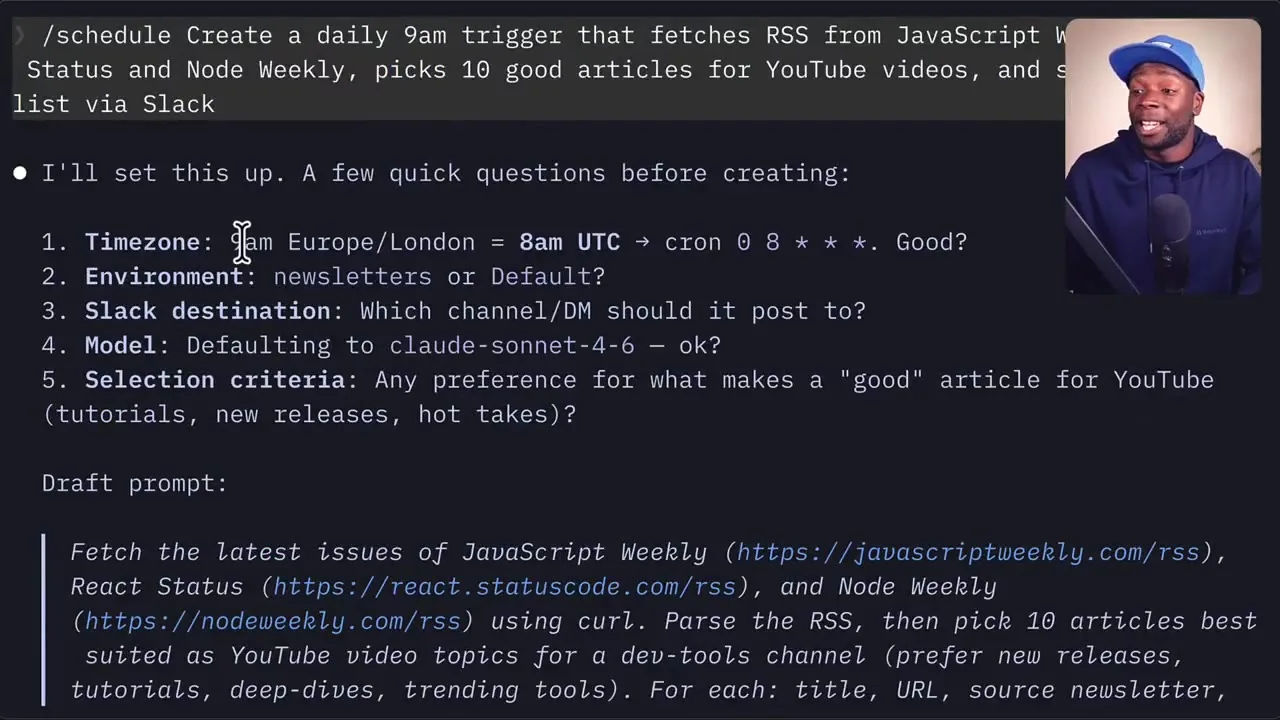
A frame from a creator walkthrough of setting up a routine.
The 3 Ways to Trigger a Routine
A routine trigger is the event that starts a run. As of November 2026 there are 3 kinds: a schedule, such as hourly, nightly, weekly or once at a set time; an API call to the task's own endpoint; and a GitHub event, such as a new pull request. One task can combine several triggers, so a review job can run every night and also fire whenever a new pull request opens.
You might want to kick them off on a time based schedule or you might want to work event based.
Routines can work natively with GitHub events as well as your own custom events that you can post to webhooks and endpoints with the event payload as context.
You can set up one routine to go ahead and create docs PRs, and you can set up another routine that maybe triggers on that PR's creation to actually go ahead and leave comments on the PR before a human actually gets to it.
So a routine can run on a GitHub webhook event firing, or it can run on an API trigger by sending a post request from your own code.
Cloud Routines vs Local Tasks vs /loop
Claude Code has 3 ways to schedule work, and the difference is where they run. As of November 2026 the docs compare them this way: cloud tasks need no machine and start from a fresh clone, Desktop scheduled tasks run on your machine with your local files, and /loop repeats a prompt only while the session stays open. Cloud tasks have a minimum gap of 1 hour, while /loop can repeat every minute.
The key limitation with these local routines is that they only run while your computer is on.
So a lot of routines actually belong in level 2, where those scheduled tasks run in the cloud, so that even if your computer is off, you have the assurance that those scheduled tasks will run even without you.
The loop command in Claude Code is one of the most valuable commands, because you can now schedule Claude Code to do things on a loop.
You can say, execute this plan step by step, resolve any conflicts and do this in a loop, and you can keep your laptop running overnight and then wake up next morning.
Good First Routines to Try
A good first routine is a small, repeatable job with a clear result you can check the next morning. In 2026 people commonly start with error checks, daily PR reviews, newsletter or news digests sent to Slack, and documentation updates. Start with 1 task, check its runs for a week, then add more. Keep the prompt short and specific so each run ends with a result you can read in a minute or two.
You can tell it to wake up every 15 minutes, wake up every month and do this certain thing.
If you're building an app, you can have it check the errors to see if there's any errors today, then send you a message on Discord or send you an email and tell you what the errors are so you can fix them.
Think right now: what are some tasks that you do every day that would help if they could run on a schedule?
If you have a lot of routines in here and you actually don't remember anymore setting this up, and you actually don't need this particular automation anymore, then it might be worth retiring it as well.
Check Your Routine Plans With Pachat
Pachat is a web product at pachat.ai, described on the site as "Different personal AI agents, in one group chat." A routine runs without you watching, so it pays to have a few AIs look over the prompt before you switch it on.
- Write down the routine: its trigger, its prompt and the connectors it will use.
- Open pachat.ai and put your Claude, Grok Bot, Muse and ChatGPT dots in one group chat.
- Ask what could go wrong when it runs alone. They check each other's facts and argue it out, then you make the call.
For more, read how to use Claude Code, Claude Code remote control and Cursor background agents.
FAQ
What are Claude Code routines called now?
As of November 2026, Anthropic's docs call them cloud scheduled tasks, formerly routines. The old name still appears in places such as the claude.ai/code/routines page, and /routines works as an alias for the /schedule command. They are in research preview, so behavior and limits may change. Check the official docs page before you depend on a task for important work.
Do Claude Code routines run when my laptop is closed?
Cloud routines do. They run on Anthropic-managed cloud infrastructure, so your computer can be off. Desktop scheduled tasks and /loop are different: as of November 2026 the docs say both run on your own machine, and /loop also needs the session to stay open. Pick the cloud option for anything that must run every day.
How often can a routine run?
As of November 2026, you can pick presets like hourly, daily or weekly, set a custom cron expression, or schedule a single run at a future time. Cloud tasks reject expressions that would run more often than once per hour. For faster polling inside a session, /loop can repeat as often as every 1 minute.
Which plans include Claude Code routines?
The 2026 docs list cloud scheduled tasks on Pro, Max, Ultra, Team and Enterprise plans. Team and Enterprise owners can turn the feature off for all members in organization settings. Runs belong to your own account, so commits, pull requests and messages they create appear under your GitHub user and linked accounts.
What is the difference between a routine and /loop?
A routine is saved to your cloud account and runs on its own, from a schedule, an API call or a GitHub event. /loop is a bundled command that repeats a prompt in the current session. As of 2026, a recurring /loop task expires 7 days after creation, while cloud routines keep running until you pause or delete them.
Can Pachat help me plan a routine?
Yes. Pachat is a web product at pachat.ai where you put your Claude, Grok Bot, Muse and ChatGPT dots in one group chat. Paste your routine prompt and trigger, such as a 9am daily summary, and ask what could fail with no one watching. They check each other's facts and argue it out, then you make the call.
Ready to put different AIs in one group chat? Start at pachat.ai.
References
- Claude Code Docs, "Automate work with scheduled tasks," fetched 2026-11-18: https://code.claude.com/docs/en/routines
- Claude Code Docs, "Run prompts on a schedule," fetched 2026-11-18: https://code.claude.com/docs/en/scheduled-tasks
- @0xPagor, 2026-07-02: https://x.com/0xPagor/status/2072651180291883363
- @plutos_eth, 2026-07-09: https://x.com/plutos_eth/status/2075012430829170815
- @Enzoxbt01, 2026-09-07: https://x.com/Enzoxbt01/status/2096926957065924781
- @DNormandin1234, 2026-10-05: https://x.com/DNormandin1234/status/2106912456404615664
- @taytaycodes, 2026-10-31: https://x.com/taytaycodes/status/2116428205863379152
- @kreia, 2026-10-31: https://x.com/kreia/status/2116347172413436344
- @2xnmore, 2026-05-04: https://x.com/2xnmore/status/2051315918194528275