 Pachat.ai

Cursor Background Agents: What They Are and How to Use Them
Updated 2026-11
TL;DR: Cursor background agents are now called Cloud Agents. They run in isolated virtual machines in the cloud with a full development environment, so you can run many of them in parallel without keeping your own computer online. You connect a repo, set your secrets, give a task from the desktop app, the web, your phone or Slack, and the agent pushes its changes to a branch and opens a pull request.
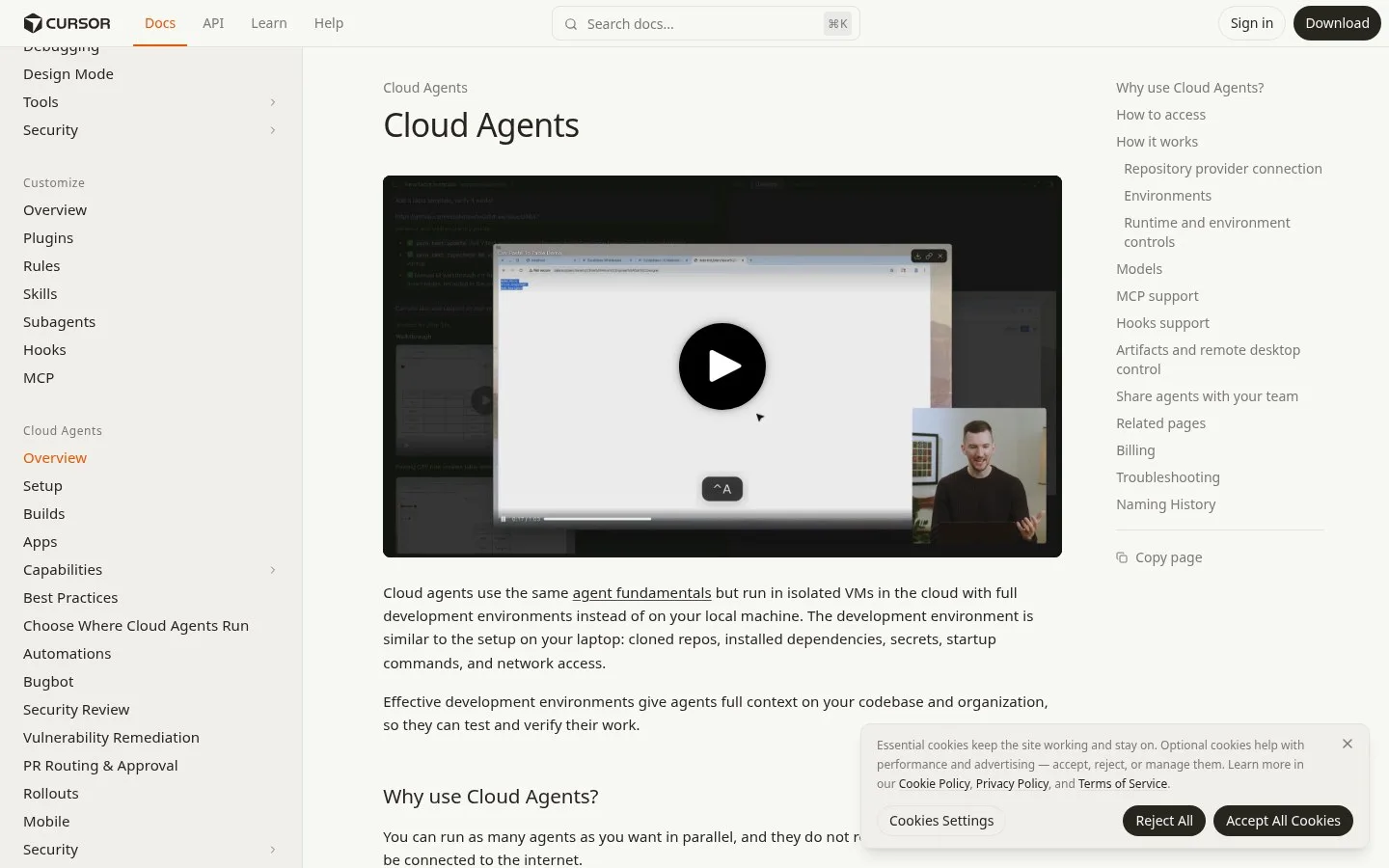
Screenshot of the official Cursor docs page on Cloud Agents.
What Are Cursor Background Agents?
Cursor background agents are coding agents that run in the cloud instead of on your laptop, and the official docs now call them Cloud Agents. As of November 2026 the Cursor docs say plainly that Cloud Agents were formerly called Background Agents. Each one runs in an isolated VM with cloned repos, installed dependencies, secrets, startup commands and network access, so 1 agent can build, test and check its own work.
Cursor has this concept called Cloud Agents.
So you'll want to test how it actually works, what it can do, what it cannot do, and so on. The whole idea of cursor Cloud Agent is that it can run whatever is possible on your computer on cloud.
And also the nice thing about cursor cloud agents is that they'd run in the cloud and they also have their own virtual machine.
They can test your application, they can click around, they can take CPU traces, all that good stuff.
Why Background Agents Change How You Work
The main change with background agents is that work no longer depends on your own machine being open and online. The November 2026 docs put it in 1 line: you can run as many agents as you want in parallel, and they do not require your local machine to be connected to the internet. That unlocks a lot of possibilities, because you are no longer the only one starting the work.
The agent can also run 24/7, even when you are asleep.
You can not only rely on you starting the agent, the agent can start on its own when you are not with your computer. It can also start based on the Slack messages it triggered. And another thing that it unlocks is it no longer limited by how much your local computer can run.
That means Cursor can just give you 10 machines or even more to run things in parallel.
Your agents will no longer fight for the same port.
How to Start a Cursor Background Agent
Starting a Cursor background agent is a short setup followed by a plain-language task. Since the renaming to Cloud Agents, the November 2026 docs list 7 places to kick one off: Cursor for iOS, Cursor Web, Cursor Desktop, Slack, GitHub or Bitbucket, Linear and the API. Before anyone can start one from a repository, an account admin needs to connect source control.
- Go to cursor.com slash agents and open the dashboard. In one walkthrough, the first step was to open settings and turn on privacy mode, because the older legacy mode did not work for this.
- Connect your GitHub repo and give it whatever permission you need to give, and also select the branch that you want to operate on. GitLab, Bitbucket Cloud and Azure DevOps also work.
- Set up any kind of environment variables. Go to Cloud Agents, and under that there is this thing called secrets. This is where you need to set up your environment variables.
- Give the task. In Cursor Desktop, select Cloud in the dropdown under the agent input; on the web, type it at cursor.com/agents.
Once you set up all of these things, it can actually start to work and you can start writing tests and whatnot.
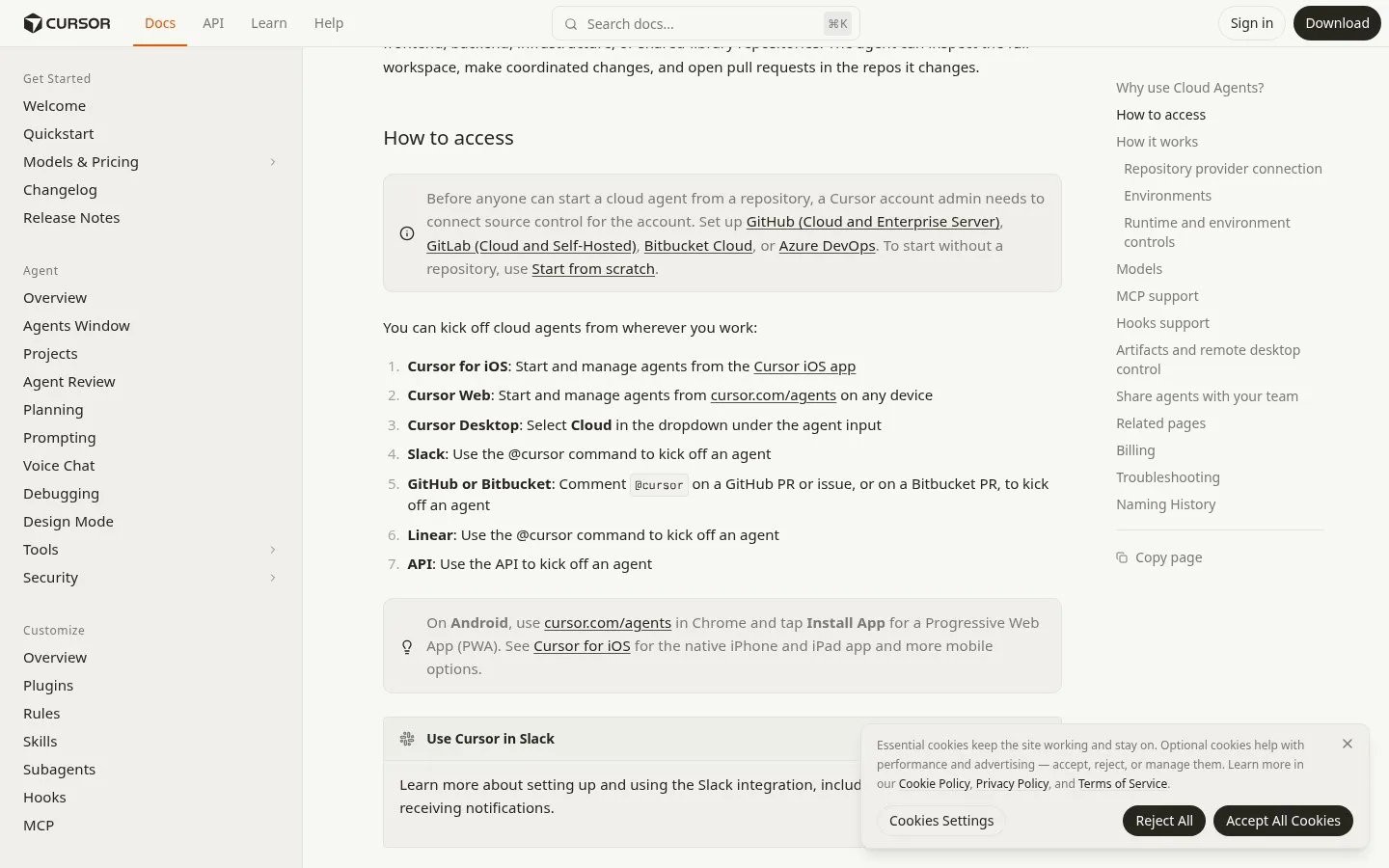
Screenshot of the Cloud Agents docs, listing where you can start an agent.
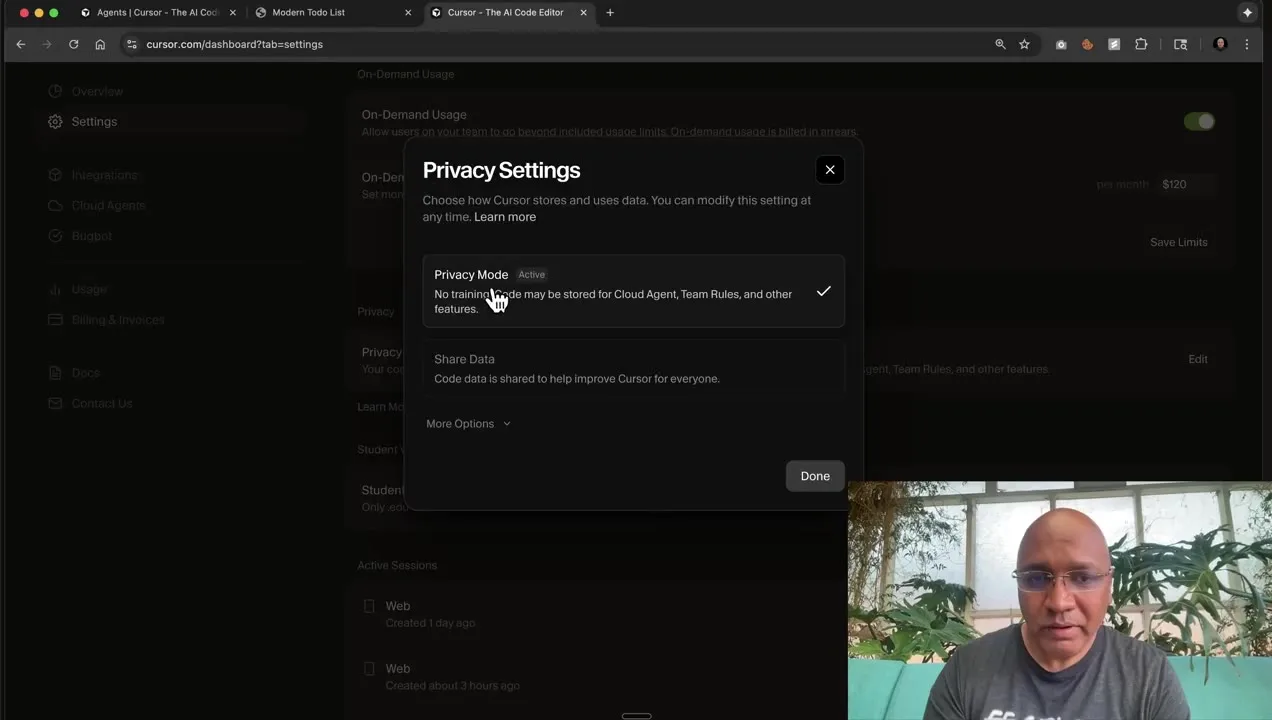
Frame from a setup demo: the privacy settings step in the Cursor dashboard.
What a Background Agent Does With Your Task
What a background agent does is take your task, copy your repo into its own environment and work on a separate branch. In a November 2025 test, it ran the project's tests in the cloud, and all 3 checks of the flow worked: the tests ran, the change was made and a pull request came back. The prompt was simply: "Hey, can you run some tests in my project?"
So basically what it's going to do now is to copy the repo from Github and then actually run it in a container somewhere in the cloud.
In this case, the project actually has a test to check if a database connection exists, just to see if it can actually run some real backend tests. So it looks like it actually did the test and it's all passed. This is pretty great, right? So you can actually run some tests while you're on the go.
Then one more request: "Make my to do list app white themed instead of dark themed." Once it's done with the changes, what it does is it actually creates a branch and it creates a pull request and you can actually start merging the branch and then checking it out.
In that late-2025 test, one limit stood out: you cannot actually view the app. Today's docs describe more: agents produce merge-ready PRs with artifacts such as screenshots, videos and logs, and you can take control of the agent's remote desktop to try the changed software yourself.
Run Background Agents From Your Phone
Running background agents from your phone is one of the most common ways people use them. Cursor launched an iOS app in public beta in June 2026 with cloud agent support, and the docs list Cursor for iOS as 1 of the official places to start and manage agents. On Android, you can open cursor.com/agents in Chrome and install it as a web app.
Cursor can test and use your software in the cloud with all the same tools you'd use on your MacBook and then send you a video demo showing that it works.
You can then read the code or give the model feedback, and when you're ready, merge it from your phone. You can do these extremely long voice notes where you're going into as much detail as possible. You'll be grabbing lunch or even about to fall asleep and you'll quickly fire off a few agents with ideas you have.

Frame from a short demo of the Cursor iOS app.
When the agent's done, you can get notifications or monitor it using the live activity on iOS. Finally, if you see something off with the UI, you can take a screenshot, then hit markup and actually draw on the UI or leave feedback like "tighten up spacing."
And you can use the app as a remote control for agents running on your computer.
Split Big Jobs Across Several Agents
Splitting a big job across several background agents is a pattern that works because each agent runs on its own machine. A November 2025 example used multiple agents to refactor away all the default exports in a web application, with 1 area of the code base per agent. They were responsible for separate domains or areas of the code base.
And this makes it more efficient. The background agents can work with more parts at the same time.
And it's also easier for the human to actually review the code. The same builder then used the Background Agent API to make a small planner app. The little service is using the Cursor background API to create an agent that is only responsible for planning. So it takes in your request, it analyzes the code base, and it should come back with either follow up questions or a plan with either one or multiple sub agents and what they are responsible for doing.
Thanks to their great API, you can create these abstractions yourself.
Another builder made a Kanban board for Cursor cloud agents in June 2026. You can add a task from the board or through a skill in your coding agent, then run each task in its own independent cloud agent session. It is open source, and you can download the app as a DMG file from GitHub.
Let Another Bot Start Background Agents
Letting another bot start your background agents is a newer setup, where a general assistant hands coding jobs to Cursor's cloud. In a September 2026 livestream, the advice was to have Grok Bot spin up cloud agents, with 1 instruction doing the work: tell your bot to spawn a cloud agent. Cloud agents are agents that run on Cursor's harness.
Grok Bot is a really powerful tool for orchestrating bots.
And then Cursor's harness is really good for coding.
So one thing you might like to do is to have Grok Bot basically spin up cloud agents for you. So it has all of the smarts and the engineering know-how built into the harness, and Grok Bot can manage them for you. So you can actually do all of your engineering work in Grok Bot even though you're using Cursor cloud agents.
What You Need Before You Start
What you need for Cursor background agents is a plan that includes them, a connected repo and a working environment. The November 2026 docs list Premium and higher, Teams, Enterprise or a legacy paid plan, and they note that Free and Plus do not include Cloud Agents. You also need read-write access to your repo and any dependent repos or submodules.
- Environments matter most. The docs compare skipping environment setup to not giving your engineers a computer. You can set one up with agent-led setup, a saved snapshot, or a Dockerfile in
.cursor/environment.json. - Secrets are injected when an agent starts. Agents already running won't pick up new secrets, so start a new agent after adding them.
- Cloud agents can use MCP servers set up for your team, and they run command-based hooks from
.cursor/hooks.json. - To share a run, send the agent's URL to a teammate. They also need access to the repository the agent worked in.
Use Cursor Background Agents With Pachat
Background agents do the coding in Cursor's cloud, and Pachat is where you can put different AIs side by side to look at the result. Pachat is a web product at pachat.ai, described on the site as "Different personal AI agents, in one group chat."
- Let your Cursor cloud agent finish the task and open its pull request.
- Open pachat.ai and put your Claude, Grok Bot, Muse and ChatGPT dots in one group chat.
- Ask the group about the plan or the change. They check each other's facts and argue it out, then you make the call.
For more on coding agents side by side, read the Codex and Claude Code use case, the Claude Code agent page and the guide on how to build an AI agent.
FAQ
What are Cursor background agents?
Cursor background agents are coding agents that run in isolated virtual machines in the cloud instead of on your computer. In 2026 Cursor renamed them Cloud Agents, and the docs say they were formerly called Background Agents. Each one gets a full development environment with your repo, dependencies and secrets, so it can write code, run tests and open a pull request on its own branch.
Are background agents and Cloud Agents the same thing?
Yes. Cloud Agents is the current name for what Cursor first called Background Agents, and the November 2026 docs keep a naming history note that says so. Older videos and posts from 2025 use the old name and describe an earlier version, so some limits they mention, such as not being able to view the app, are covered today by artifacts and remote desktop control.
Where can I start a Cursor background agent?
The docs in November 2026 list 7 places: the Cursor iOS app, Cursor Web at cursor.com/agents, Cursor Desktop by choosing Cloud under the agent input, Slack by mentioning Cursor, a comment mentioning Cursor on a GitHub issue or pull request or a Bitbucket pull request, Linear, and the API. On Android you can install cursor.com/agents from Chrome as a web app.
Do background agents need my computer to stay on?
No. Cloud agents run on their own virtual machines, and the docs say they do not require your local machine to be connected to the internet. You can start one, close your laptop and check back later from the web or the phone app. As of 2026 you can also run many agents at once, since each one gets a separate machine instead of sharing your 1 laptop.
How do I give a background agent my environment variables?
Add them as secrets in the Cloud Agents section of the Cursor dashboard at cursor.com/dashboard/cloud-agents. Secrets are scoped to the workspace or team, and they are injected when an agent starts, so an agent that is already running will not see a secret you just added. Start a new agent after adding them, as the November 2026 docs advise, and check that you are on the right account.
Can Pachat check what a background agent built?
Pachat does not run Cursor agents, but it is a place to talk the result through. Pachat is a web product where you put your Claude, Grok Bot, Muse and ChatGPT dots in one group chat, and they check each other's facts and argue it out, then you make the call. In 2026 you can let a cloud agent open a pull request, then bring the plan or diff summary to pachat.ai.
Ready to put different AIs in one group chat? Start at pachat.ai.
References
- Cursor Docs, "Cloud Agents," fetched 2026-11-18: https://cursor.com/docs/cloud-agent
- @rajaraodv, 2025-11-07: https://x.com/rajaraodv/status/1986585910193086777
- @WilliamHolmbe19, 2025-11-08: https://x.com/WilliamHolmbe19/status/1987124588568785356
- @taishik_, 2026-06-22: https://x.com/taishik_/status/2069091881762324918
- @AINativeF, 2026-06-30: https://x.com/AINativeF/status/2071946209158422787
- @ChrisSimpson, 2026-09-15: https://x.com/ChrisSimpson/status/2099932833603326164
- @ChrisSimpson, 2026-09-15: https://x.com/ChrisSimpson/status/2099952318678470701