 Pachat.ai
How to Use Claude Code: A Beginner's Guide
Updated 2026-11
TL;DR: Claude Code is an AI agent that reads, creates and fixes files on your own computer, so the result stays on your machine. To use it well, start in a practice folder, tell it what you want to make, what to use as a reference and what "done" looks like, then add commands such as /btw, /fork and /loop once the basics feel easy.
What Claude Code actually does on your computer
Claude Code is an AI agent that works directly with the files on your computer, not just a chat window. As of November 2026, Anthropic's docs list four places to run it: the terminal, an IDE, the desktop app and the web. You install it with one command, open a project folder, type claude and sign in with a paid Claude plan or a Console account.
The difference from a chatbot is easy to state. In one beginner seminar it is put this way: Claude Code actually reads, creates and fixes the files on your own computer, and in some cases deletes them, and "the result really stays on your computer." That is the main point.
The loop is simple. It looks for files and reads them to gather information, does the work, fixes files and runs commands, checks the result, and then asks you, "Is this really OK?" If it is wrong and you tell the AI so, it goes back and gathers again. You can cut in at any point along the way, so the human stays in charge while the AI does the work.
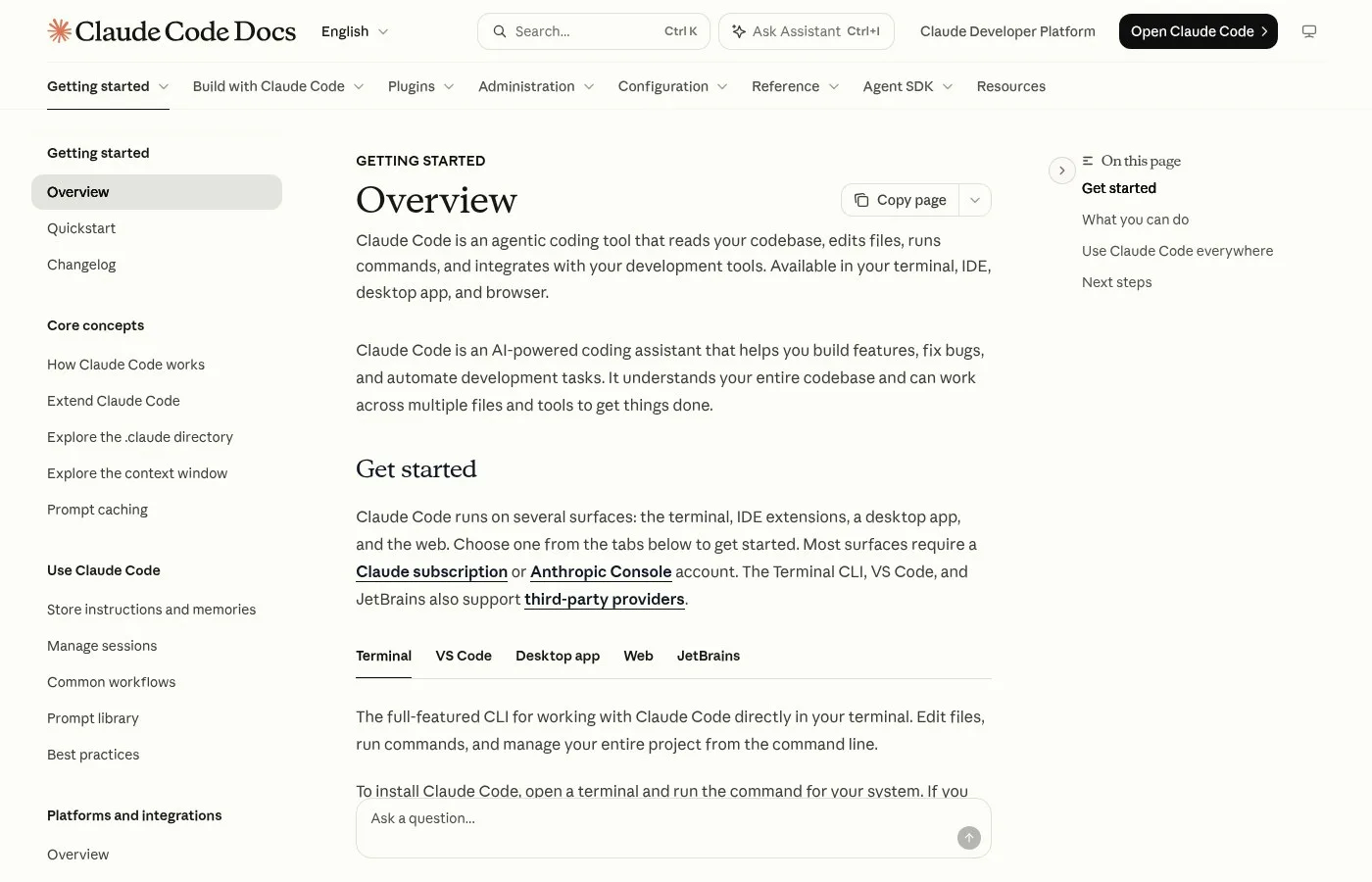
Screenshot: the Claude Code overview in Anthropic's docs, November 2026.
Start in a practice folder
A practice folder is an empty folder you give Claude Code before you let it near anything important. It matters because, as of 2026, Claude Code can delete files as easily as it creates them. The same seminar speaker tells a story from his first weeks: once Claude Code could touch files, he got carried away on his desktop, and it mixed up an empty folder with the same name and deleted all of his important files. "A big failure," he laughs.
He calls it his own checking mistake as much as the tool's. To avoid it, make a folder such as "claude-practice"; one sentence at the start and Claude Code will create the practice folder for you. His advice: at first, please do not put important folders in it.
Once a few small tasks go well there, open a real project folder.
How to ask Claude Code: say three things
The best way to ask Claude Code is to say three things: what you want to make, what to use as a reference, and what counts as finished. As of November 2026 you no longer need long, detailed prompts, because Claude Code now asks about unclear points itself. One speaker explains that Claude Code now asks you about the vague parts, so instead of polishing a prompt you just say what you want to make, what to refer to, and what the goal is, "when what is done, is it finished?"
A reference can be as short as "I want Apple-style design" or "I want Microsoft's color scheme." After that, the AI keeps going round by itself and runs all the way to the goal. "That's the good part of Claude Code."
A video editor who now edits by talking to Claude Code uses almost the same recipe:
- Where the material is. Tell it the folder as exactly as you can.
- A model to follow. One phrase such as "like this channel" sets the level.
- The purpose. Who should feel what. Once you state the purpose, the editing decisions lean toward it.
In his test, a 5-minute clip shot straight on an iPhone became a 48-second short in about 32 minutes, from a single request. A 16-minute-48-second explainer became a 12-minute-40-second long version with 48 diagrams. When he asked for a melancholy mood, it brought an over-the-top sad piano. His warning is the one to remember:
But AI can't hear sound. In the end, a person watches it all the way through.
Learn /btw, /fork and /loop
The /btw, /fork and /loop commands are three built-in shortcuts that keep one session tidy while you work. As of November 2026, Anthropic's command reference describes /btw as a side question that does not get added to the conversation history, /fork as a copy of the current conversation into a new background session, and /loop as a prompt that repeats on an interval while the session is open, for example /loop 5m check if the deploy finished.
One short explainer puts /btw in plain words: if you think of another errand while it is working, it splits just that off into a separate thread, "so the interruption doesn't get mixed in." /fork lets you branch off from the current thread and try a different approach. At the time it described the new project feature as being in public beta on the Pro, Max and Ultra plans.
Anthropic's Boris Cherny says /loop is the command he now uses more and more:
It's like the simplest thing that works. All it is is you have Claude use cron to schedule a job for some point in the future, and it's a repeat job.
He adds: "At this point I have like dozens of loops that are running." One babysits his PRs, fixing CI and auto-rebasing, another keeps CI healthy when there is a flaky test, and another grabs feedback from Twitter and clusters it every 30 minutes.

Frame from an interview clip with Boris Cherny, November 2026.
Real work people hand to Claude Code
Real Claude Code work is broad: as of 2026 it ranges from staff schedules to video channels to a map of your own setup. In each case a person checks the result at the end, and the payoff is biggest for daily, repeated work. The seminar speaker's team uses it once a day to read the base data for a staff roster from Google Drive, read each person's unavailable days from Google Calendar, make the assignments, register them in Google Calendar and report the result to him by Gmail. He checks it and copies it to the shared calendar. Making the roster now takes "really one tenth" of the time, and the draft reaches staff about 5 days sooner.
The same speaker runs a fully automatic loop for a children's channel: research, composing, script, image generation, image-to-movie, editing, posting to YouTube, and then having it analyze YouTube's analytics. He points to four handy tools behind this kind of setup: skills, MCP, hooks and subagents.
Another user mapped his own setup into one picture:
One setup shows everything inside a Claude Code install: 64 skills, 280 memories, 29 MCP servers.
The map lights up the skills Claude uses while it is running, and it only reads what is on the computer without sending anything outside.
Get comfortable with the tools
The fastest way to get comfortable with Claude Code is to use it on small, real tasks every week. Boris Cherny, who leads Claude Code at Anthropic, said in November 2026 that the model writes 100% of his code and that one day he shipped about 150 PRs. He is also clear that this is not the case everywhere: big, complicated codebases and some languages are still hard for the model.
His advice for everyone else is short:
Experiment with the tools, get to know them, don't be scared of them. Just, you know, dive in.
He also suggests becoming more of a generalist: "On the Claude Code team everyone codes," from the product manager to the designer to the finance person.
How to check Claude Code's work with other agents in Pachat
Pachat gives you a second opinion on Claude Code's answer without switching tabs.
Pachat is a web product at pachat.ai: "Different personal AI agents, in one group chat." Per pachat.ai, you put your Claude, Grok Bot, Muse and ChatGPT dots in one group chat. They check each other's facts and argue it out, then you make the call.
A simple way to use it with Claude Code:
- Let Claude Code finish one task in your practice folder.
- Paste its plan or summary into a Pachat group with another agent.
- Ask the group to check the steps, then decide yourself what to run next.
For a first hands-on task, read the Claude Code tutorial. To set up a group, see the Pachat group chat guide, and for running Claude Code next to Codex, see Codex and Claude Code in one group.
Try it at pachat.ai.
FAQ
What is Claude Code?
Claude Code is Anthropic's AI agent that works with the files on your computer. As of November 2026 you can run it in the terminal, an IDE, the desktop app or the web. It reads, creates and fixes files, runs commands and checks results, then asks you whether the result is right before it continues.
How do I install Claude Code?
On macOS, Linux or WSL, Anthropic's docs give one install command, and Windows has a PowerShell command. Then open your project folder, type claude and sign in. As of November 2026 you need a Pro, Max, Ultra, Team or Enterprise plan, a Console account, or a supported cloud provider. The desktop app needs a paid plan.
What should I say in my first prompt?
Say three things: what you want to make, what to use as a reference, and what counts as done. As of 2026, Claude Code asks about the vague parts by itself, so a short request with those three parts works better than a long, polished prompt. Start with one small task in a practice folder.
What do /btw, /fork and /loop do?
As of November 2026, /btw asks a side question without adding it to the conversation history, /fork copies the current conversation into a new background session, and /loop repeats a prompt on an interval while the session is open, such as every 5 minutes. Learn them after your first 2 or 3 tasks go smoothly.
Can Claude Code delete my files?
Yes. Claude Code can create, change and in some cases delete files on your computer, which is why beginners are told to start in a practice folder. Keep important folders out of that folder for your first week, and read each step it proposes before you approve it. One seminar speaker lost all of his important files in 2026 when it mixed up two folders with the same name.
Do I need to know how to code?
No, but it helps to understand what it is doing. Boris Cherny said in November 2026 that today you still need to understand the layer underneath, and that in a year or 2 this may matter less. Many of the examples above, such as staff rosters and video editing, come from people who are not engineers.
How can I get a second opinion on Claude Code's output?
You can put Claude Code's summary into a Pachat group chat with your other agents. As of 2026, Pachat puts your Claude, Grok Bot, Muse and ChatGPT dots in one group chat, where they check each other's facts and argue it out, and then you make the call. Start at pachat.ai.
References
- @mirai_spark, 2026-11-03: https://x.com/mirai_spark/status/2117753700437627058 (Japanese)
- @mimi_ozzy_ai, 2026-11-17: https://x.com/mimi_ozzy_ai/status/2122622527117946990 (Japanese)
- @gembashift_jp, 2026-11-13: https://x.com/gembashift_jp/status/2121211514149654968 (Japanese)
- @nakazakifam, 2026-11-17: https://x.com/nakazakifam/status/2122659806934700420 (Japanese)
- @ClaudeCode_aca, 2026-11-13: https://x.com/ClaudeCode_aca/status/2121075595522310250
- @Haruki_Sonehara, 2026-11-10: https://x.com/Haruki_Sonehara/status/2120282856941371777
- Claude Code overview: https://code.claude.com/docs/en/overview
- Claude Code quickstart: https://code.claude.com/docs/en/quickstart
- Claude Code commands: https://code.claude.com/docs/en/commands