 Pachat.ai
第一次用 Claude Code,可以从一个结果明确的小任务开始:修好作品集首页的 About me 链接。练习只有两个 HTML 文件,不需要部署网站;完成后,你能从文件差异和浏览器点击结果判断它有没有改对。
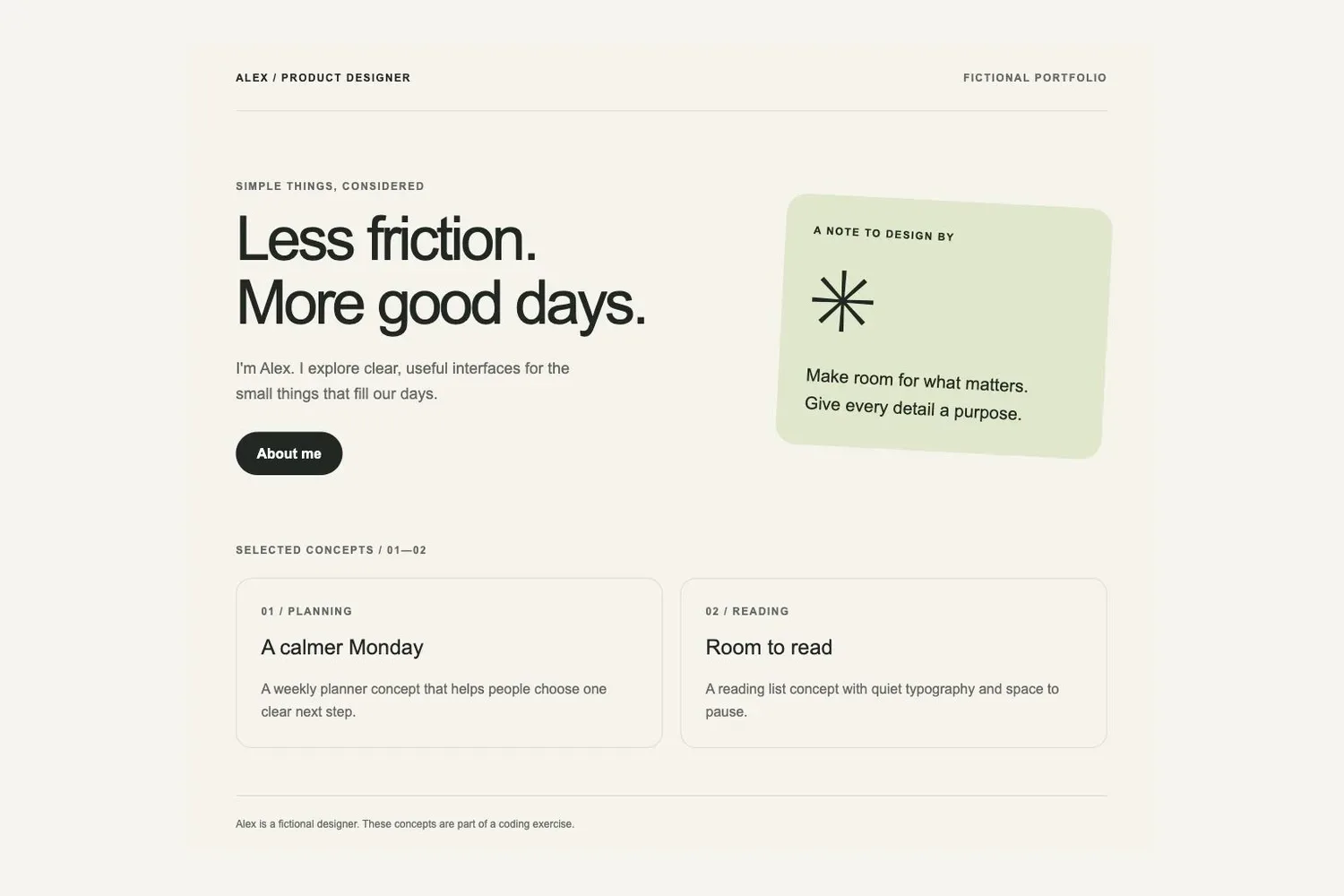
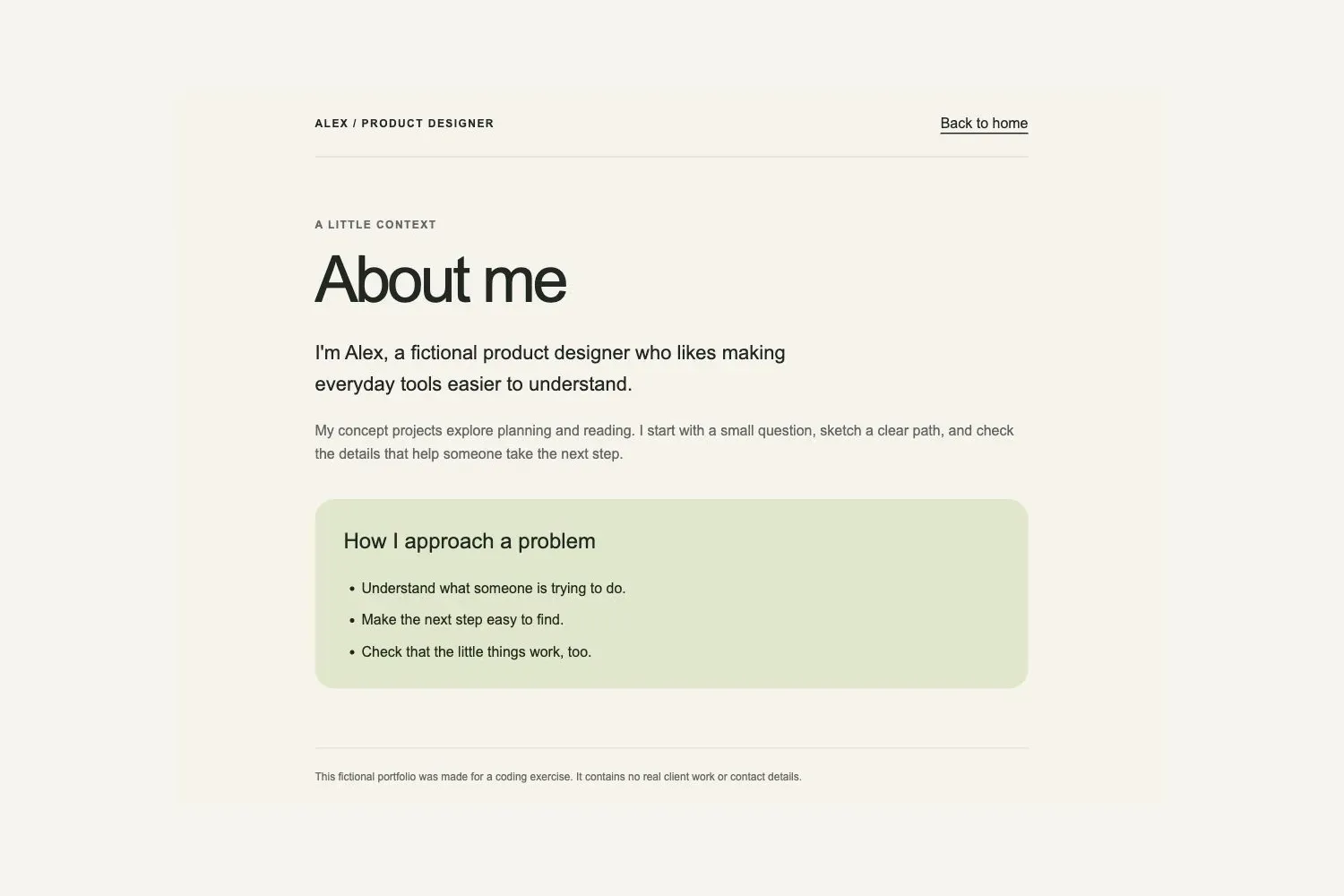
以下对话是可复制的练习指令,配图是练习网页;模型回复可能不同,请按文件变化和点击结果验收。
1. 安装、登录,进入练习文件夹
已安装 Claude Code,可以跳到版本检查。首次安装时,在终端运行与你的系统对应的命令。这两种方式来自 Anthropic 官方快速入门。
macOS、Linux 或 WSL:
curl -fsSL https://claude.ai/install.sh | bash
Windows PowerShell:
irm https://claude.ai/install.ps1 | iex
Windows 这条命令应在 PowerShell 中运行,不是 CMD。安装结束后打开一个新终端,执行:
claude --version
预期结果:显示 Claude Code 的版本号。如果显示找不到命令,先按官方快速入门中的安装故障说明处理,不要继续后面的练习。
用文件管理器创建 claude-code-link-exercise 文件夹。在终端输入 cd 加这个文件夹的完整路径;路径有空格时用英文双引号包起来。例如,下面的路径需要换成你自己的:
cd "/path/to/claude-code-link-exercise" claude
首次启动按提示在浏览器登录,使用具备 Claude Code 访问权限的账号。若浏览器没有自动打开,按终端提示复制登录链接;具体步骤见官方登录说明。确认会话显示的工作目录就是这个练习文件夹。
2. 建好两页,先复现坏链接
在练习文件夹内,用纯文本或代码编辑器新建下面两个文件。文件名必须分别是 index.html 和 about.html,不要额外带上 .txt。把对应代码完整复制进去并保存。
index.html:
<!doctype html> <html lang="en"> <head> <meta charset="utf-8"> <meta name="viewport" content="width=device-width, initial-scale=1"> <title>Alex — Thoughtful design</title> <style> :root { color-scheme: light; --ink: #202722; --paper: #f5f3eb; --muted: #62695f; --line: #d8dcd0; } * { box-sizing: border-box; } body { margin: 0; background: var(--paper); color: var(--ink); font-family: Arial, sans-serif; line-height: 1.6; } .wrap { max-width: 1060px; margin: auto; padding: 0 32px; } header { display: flex; justify-content: space-between; gap: 16px; padding: 28px 0; border-bottom: 1px solid var(--line); } .label { margin: 0; font-size: 12px; font-weight: 700; letter-spacing: .12em; text-transform: uppercase; } .muted { color: var(--muted); } .hero { display: grid; grid-template-columns: 1.5fr 1fr; gap: 64px; align-items: center; padding: 76px 0; } h1 { margin: 14px 0 24px; font-size: clamp(42px, 6vw, 70px); line-height: 1.04; font-weight: 500; letter-spacing: -.05em; } .intro { max-width: 420px; font-size: 18px; } a { display: inline-block; margin-top: 12px; padding: 12px 24px; background: var(--ink); color: white; border-radius: 30px; text-decoration: none; font-weight: 700; } a:hover { background: #3d5340; } a:focus-visible { outline: 3px solid #717f38; outline-offset: 5px; } .note { padding: 32px; border-radius: 24px; background: #dfe7c9; transform: rotate(3deg); } .symbol { margin: 20px 0; font-size: 100px; line-height: 1; } .note p:last-child { margin-bottom: 0; font-size: 20px; } .work { display: grid; grid-template-columns: 1fr 1fr; gap: 20px; margin: 22px 0 54px; } article { padding: 28px; border: 1px solid var(--line); border-radius: 18px; } h2 { margin: 12px 0 4px; font-size: 24px; font-weight: 500; } article p:last-child { margin-bottom: 0; } footer { padding: 22px 0; border-top: 1px solid var(--line); font-size: 12px; color: var(--muted); } @media (max-width: 650px) { .wrap { padding: 0 22px; } .hero { grid-template-columns: 1fr; gap: 36px; padding: 44px 0; } .work { grid-template-columns: 1fr; } .symbol { font-size: 72px; } } </style> </head> <body> <div class="wrap"> <header><span class="label">Alex / Product designer</span><span class="label muted">Fictional portfolio</span></header> <main> <section class="hero" aria-labelledby="intro-title"> <div><p class="label muted">Simple things, considered</p><h1 id="intro-title">Less friction.<br>More good days.</h1><p class="intro muted">I'm Alex. I explore clear, useful interfaces for the small things that fill our days.</p> <a href="about-me.html">About me</a></div> <aside class="note"><p class="label">A note to design by</p><div class="symbol" aria-hidden="true">✳</div><p>Make room for what matters.<br>Give every detail a purpose.</p></aside> </section> <p class="label muted">Selected concepts / 01—02</p> <section class="work" aria-label="Fictional design concepts"> <article><p class="label muted">01 / Planning</p><h2>A calmer Monday</h2><p class="muted">A weekly planner concept that helps people choose one clear next step.</p></article> <article><p class="label muted">02 / Reading</p><h2>Room to read</h2><p class="muted">A reading list concept with quiet typography and space to pause.</p></article> </section> </main> <footer>Alex is a fictional designer. These concepts are part of a coding exercise.</footer> </div> </body> </html>
about.html:
<!doctype html> <html lang="en"> <head> <meta charset="utf-8"> <meta name="viewport" content="width=device-width, initial-scale=1"> <title>About me — Alex</title> <style> :root { color-scheme: light; --ink: #202722; --paper: #f5f3eb; --muted: #62695f; --line: #d8dcd0; } * { box-sizing: border-box; } body { margin: 0; background: var(--paper); color: var(--ink); font-family: Arial, sans-serif; line-height: 1.6; } .wrap { max-width: 860px; margin: auto; padding: 0 32px; } header { display: flex; justify-content: space-between; gap: 16px; align-items: center; padding: 24px 0; border-bottom: 1px solid var(--line); } .label { margin: 0; font-size: 12px; font-weight: 700; letter-spacing: .12em; text-transform: uppercase; } a { color: var(--ink); text-underline-offset: 5px; } a:hover { color: #3d5340; } a:focus-visible { outline: 3px solid #717f38; outline-offset: 5px; } main { padding: 66px 0; } h1 { margin: 14px 0 26px; font-size: clamp(44px, 8vw, 72px); line-height: 1.04; font-weight: 500; letter-spacing: -.05em; } .intro { max-width: 620px; font-size: 22px; } .muted { color: var(--muted); } .card { margin-top: 38px; padding: 28px 32px; background: #dfe7c9; border-radius: 22px; } h2 { margin-top: 0; font-size: 24px; font-weight: 500; } ul { margin-bottom: 0; padding-left: 20px; } li + li { margin-top: 10px; } footer { padding: 22px 0; border-top: 1px solid var(--line); font-size: 12px; color: var(--muted); } @media (max-width: 650px) { .wrap { padding: 0 22px; } main { padding: 44px 0; } .card { padding: 24px; } } </style> </head> <body> <div class="wrap"> <header><span class="label">Alex / Product designer</span><a href="index.html">Back to home</a></header> <main> <p class="label muted">A little context</p> <h1>About me</h1> <p class="intro">I'm Alex, a fictional product designer who likes making everyday tools easier to understand.</p> <p class="muted">My concept projects explore planning and reading. I start with a small question, sketch a clear path, and check the details that help someone take the next step.</p> <section class="card" aria-labelledby="approach-title"> <h2 id="approach-title">How I approach a problem</h2> <ul><li>Understand what someone is trying to do.</li><li>Make the next step easy to find.</li><li>Check that the little things work, too.</li></ul> </section> </main> <footer>This fictional portfolio was made for a coding exercise. It contains no real client work or contact details.</footer> </div> </body> </html>
双击 index.html,用浏览器打开,然后点击 About me。首页把你带向 about-me.html,但文件夹里只有 about.html,所以无法到达介绍页。浏览器的报错文字可能不同;关键是目标文件名不匹配。
回到文件管理器,复制一份 index.html,将副本命名为 index.before.html。它是本次练习的原始备份,后面用来对比和恢复,不需要安装 Git。
3. 让 Claude Code 只读定位
把下面这段发给刚才打开的 Claude Code 会话:
只检查当前练习文件夹中的 index.html 和 about.html,不要修改任何文件。 首页的 About me 链接打不开。请指出它的 href、实际存在的目标文件,以及两者哪里不匹配。 index.before.html 是原始备份,不要修改,也不要把它当作需要修复的页面。 最后告诉我你建议只改哪一处。
你要核对的结果:回答应指出首页写的是 about-me.html,实际文件为 about.html,并把修复范围限定为首页链接的 href。
如果它建议新建 about-me.html、重写整个页面或改动样式,先纠正范围。这个练习已有正确的目标页,不需要为错误地址再造一页。先调查、再限定修改的顺序,也符合 Anthropic 的故障修复工作流。
4. 只修一个链接,再查看差异
确认原因后,继续发送:
只把 index.html 中 About me 链接的 href 从 about-me.html 改成 about.html。 不要修改链接文字、样式、其他正文或 about.html,也不要修改 index.before.html。 保存后对比 index.before.html 和 index.html,展示实际文件差异,并列出改动过的文件。 不要发布或部署网页。
如果出现权限提示,核对目标文件与动作是否符合上面的范围。提示是否出现取决于当前权限模式和设置,不能把“没有弹窗”当成“没有修改”。
关键差异应当只有目标文件名:
- <a href="about-me.html">About me</a></div> + <a href="about.html">About me</a></div>
这是本练习允许的修改,实际 diff 还可能带上行号和周围未变的代码。再用编辑器打开 index.html 搜索 href,确认保存后的地址;打开备份,确认其中仍是旧地址。若整页内容或其他文件也变了,这次就还没有满足“只改一处”的要求。
5. 在浏览器里验收
回到浏览器的首页并刷新;也可以重新双击练习文件夹里的 index.html。再次点击 About me,逐项检查:
| 检查项 | 应看到的结果 |
|---|---|
| 点击首页链接 | 打开本地 about.html |
| 页面内容 | 出现 About me 标题,而不是找不到文件的报错 |
| 返回首页 | 点击介绍页的 Back to home,回到 index.html |
| 修改范围 | index.html 只改了那一处目标地址,备份与介绍页保持原样 |
如果还是打不开,先看地址栏是否仍为旧的 about-me.html,再确认你打开的是这份练习目录而非另一份副本。还要检查文件是否保存成了 about.html.txt,以及两个文件是否放在同一层目录。
以实际点击结果作为验收依据。Claude Code 说“修好了”,不能代替这一步。
6. 恢复原状,确认自己能控制改动
练习结束后,可以在编辑器中打开 index.before.html,把它的全部内容复制回 index.html 并保存。然后刷新首页,再点击 About me:应当重新出现原来的坏链接。这说明你恢复的是修改前的版本。
需要保留修复结果时,再把首页那一处 about-me.html 改为 about.html,重复上一节的点击验收。完成标准包括三件事:能指出原因、能确认最小修改、能恢复原状。
以后遇到需要第二个 Agent 复核的真实项目,可以把相关代码与 diff 交给它。Pachat 的接入和分工已有Claude Code 协作指南;这次练习先在本地完成即可。
参考资料
- Claude Code 快速入门,Anthropic(英文)。
- 登录与身份验证,Anthropic(英文)。
- 权限配置,Anthropic(英文)。
- 常见工作流,Anthropic(英文)。
- Claude Code 与其他 Agent 协作,Pachat(英文)。