 Pachat.ai
For your first Claude Code task, choose something with a clear result: fix the About me link on a portfolio homepage. This exercise uses just two HTML files and needs no website deployment. File differences and browser clicks will tell you whether the change is correct.
The messages below are practice instructions you can copy; the screenshots show the exercise website. Model replies may differ, so judge the result by the saved files and what happens when you click.
1. Install, sign in and open the exercise folder
If Claude Code is already installed, skip to the version check. Otherwise, run the command for your system in a terminal. Both methods come from Anthropic's official quickstart.
macOS, Linux or WSL:
curl -fsSL https://claude.ai/install.sh | bash
Windows PowerShell:
irm https://claude.ai/install.ps1 | iex
Run the Windows command in PowerShell, not CMD. When installation finishes, open a new terminal and run:
claude --version
Expected result: a Claude Code version number. If the command cannot be found, follow the installation troubleshooting in the quickstart before continuing.
Create a folder named claude-code-link-exercise in your file manager. In the terminal, type cd followed by the folder's full path, using double quotation marks if it contains spaces. Replace the example path below with your own:
cd "/path/to/claude-code-link-exercise" claude
On first launch, follow the browser sign-in prompts with an account that has Claude Code access. If the browser does not open, follow the terminal's instructions to copy the login link; see Anthropic's sign-in guide. Check that the session's working directory is your exercise folder.
2. Create both pages and reproduce the problem
Use a plain-text or code editor to create the following files inside the exercise folder. Name them exactly index.html and about.html, without an extra .txt extension. Copy each complete block into its corresponding file and save it.
index.html:
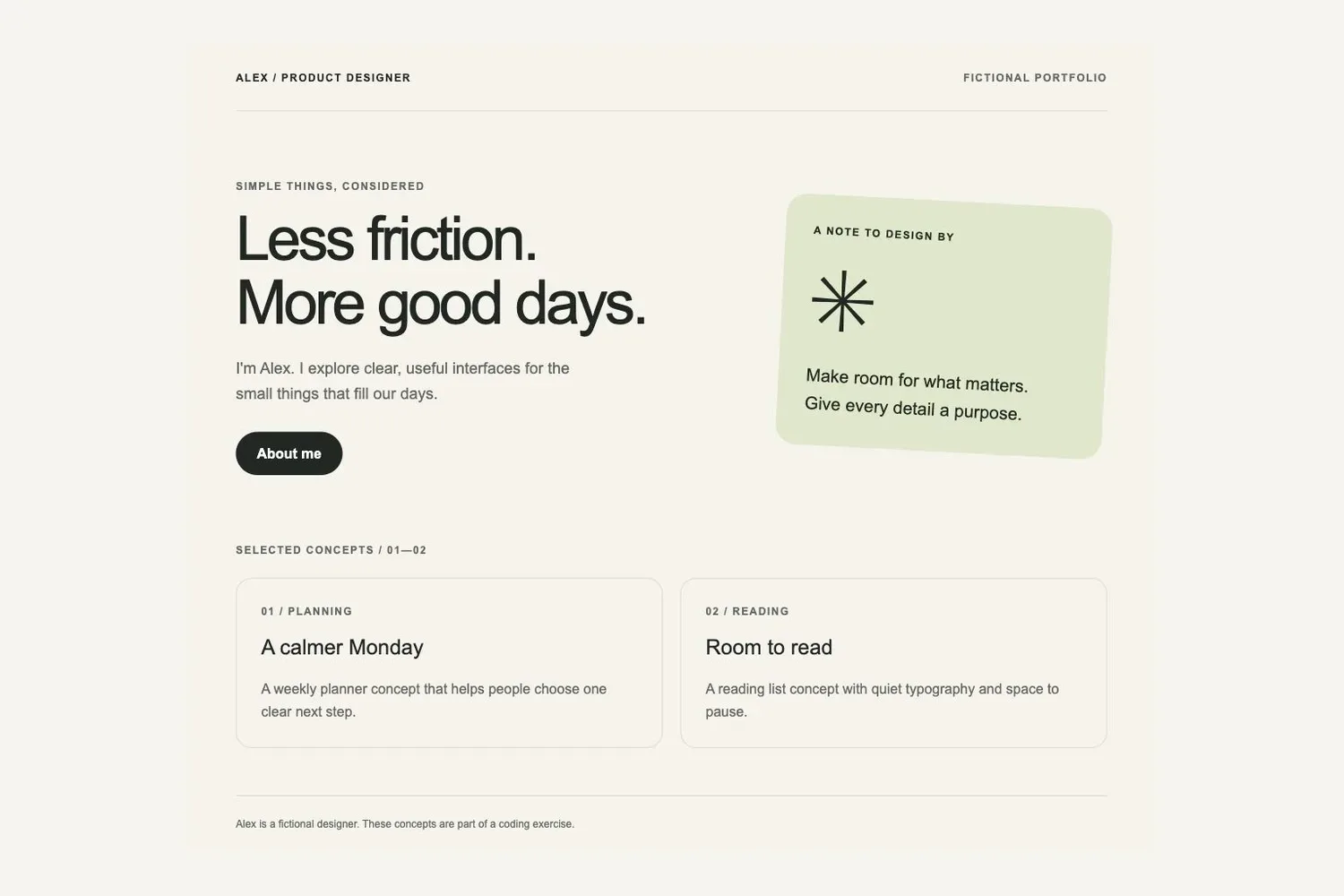
<!doctype html> <html lang="en"> <head> <meta charset="utf-8"> <meta name="viewport" content="width=device-width, initial-scale=1"> <title>Alex — Thoughtful design</title> <style> :root { color-scheme: light; --ink: #202722; --paper: #f5f3eb; --muted: #62695f; --line: #d8dcd0; } * { box-sizing: border-box; } body { margin: 0; background: var(--paper); color: var(--ink); font-family: Arial, sans-serif; line-height: 1.6; } .wrap { max-width: 1060px; margin: auto; padding: 0 32px; } header { display: flex; justify-content: space-between; gap: 16px; padding: 28px 0; border-bottom: 1px solid var(--line); } .label { margin: 0; font-size: 12px; font-weight: 700; letter-spacing: .12em; text-transform: uppercase; } .muted { color: var(--muted); } .hero { display: grid; grid-template-columns: 1.5fr 1fr; gap: 64px; align-items: center; padding: 76px 0; } h1 { margin: 14px 0 24px; font-size: clamp(42px, 6vw, 70px); line-height: 1.04; font-weight: 500; letter-spacing: -.05em; } .intro { max-width: 420px; font-size: 18px; } a { display: inline-block; margin-top: 12px; padding: 12px 24px; background: var(--ink); color: white; border-radius: 30px; text-decoration: none; font-weight: 700; } a:hover { background: #3d5340; } a:focus-visible { outline: 3px solid #717f38; outline-offset: 5px; } .note { padding: 32px; border-radius: 24px; background: #dfe7c9; transform: rotate(3deg); } .symbol { margin: 20px 0; font-size: 100px; line-height: 1; } .note p:last-child { margin-bottom: 0; font-size: 20px; } .work { display: grid; grid-template-columns: 1fr 1fr; gap: 20px; margin: 22px 0 54px; } article { padding: 28px; border: 1px solid var(--line); border-radius: 18px; } h2 { margin: 12px 0 4px; font-size: 24px; font-weight: 500; } article p:last-child { margin-bottom: 0; } footer { padding: 22px 0; border-top: 1px solid var(--line); font-size: 12px; color: var(--muted); } @media (max-width: 650px) { .wrap { padding: 0 22px; } .hero { grid-template-columns: 1fr; gap: 36px; padding: 44px 0; } .work { grid-template-columns: 1fr; } .symbol { font-size: 72px; } } </style> </head> <body> <div class="wrap"> <header><span class="label">Alex / Product designer</span><span class="label muted">Fictional portfolio</span></header> <main> <section class="hero" aria-labelledby="intro-title"> <div><p class="label muted">Simple things, considered</p><h1 id="intro-title">Less friction.<br>More good days.</h1><p class="intro muted">I'm Alex. I explore clear, useful interfaces for the small things that fill our days.</p> <a href="about-me.html">About me</a></div> <aside class="note"><p class="label">A note to design by</p><div class="symbol" aria-hidden="true">✳</div><p>Make room for what matters.<br>Give every detail a purpose.</p></aside> </section> <p class="label muted">Selected concepts / 01—02</p> <section class="work" aria-label="Fictional design concepts"> <article><p class="label muted">01 / Planning</p><h2>A calmer Monday</h2><p class="muted">A weekly planner concept that helps people choose one clear next step.</p></article> <article><p class="label muted">02 / Reading</p><h2>Room to read</h2><p class="muted">A reading list concept with quiet typography and space to pause.</p></article> </section> </main> <footer>Alex is a fictional designer. These concepts are part of a coding exercise.</footer> </div> </body> </html>
about.html:
<!doctype html> <html lang="en"> <head> <meta charset="utf-8"> <meta name="viewport" content="width=device-width, initial-scale=1"> <title>About me — Alex</title> <style> :root { color-scheme: light; --ink: #202722; --paper: #f5f3eb; --muted: #62695f; --line: #d8dcd0; } * { box-sizing: border-box; } body { margin: 0; background: var(--paper); color: var(--ink); font-family: Arial, sans-serif; line-height: 1.6; } .wrap { max-width: 860px; margin: auto; padding: 0 32px; } header { display: flex; justify-content: space-between; gap: 16px; align-items: center; padding: 24px 0; border-bottom: 1px solid var(--line); } .label { margin: 0; font-size: 12px; font-weight: 700; letter-spacing: .12em; text-transform: uppercase; } a { color: var(--ink); text-underline-offset: 5px; } a:hover { color: #3d5340; } a:focus-visible { outline: 3px solid #717f38; outline-offset: 5px; } main { padding: 66px 0; } h1 { margin: 14px 0 26px; font-size: clamp(44px, 8vw, 72px); line-height: 1.04; font-weight: 500; letter-spacing: -.05em; } .intro { max-width: 620px; font-size: 22px; } .muted { color: var(--muted); } .card { margin-top: 38px; padding: 28px 32px; background: #dfe7c9; border-radius: 22px; } h2 { margin-top: 0; font-size: 24px; font-weight: 500; } ul { margin-bottom: 0; padding-left: 20px; } li + li { margin-top: 10px; } footer { padding: 22px 0; border-top: 1px solid var(--line); font-size: 12px; color: var(--muted); } @media (max-width: 650px) { .wrap { padding: 0 22px; } main { padding: 44px 0; } .card { padding: 24px; } } </style> </head> <body> <div class="wrap"> <header><span class="label">Alex / Product designer</span><a href="index.html">Back to home</a></header> <main> <p class="label muted">A little context</p> <h1>About me</h1> <p class="intro">I'm Alex, a fictional product designer who likes making everyday tools easier to understand.</p> <p class="muted">My concept projects explore planning and reading. I start with a small question, sketch a clear path, and check the details that help someone take the next step.</p> <section class="card" aria-labelledby="approach-title"> <h2 id="approach-title">How I approach a problem</h2> <ul><li>Understand what someone is trying to do.</li><li>Make the next step easy to find.</li><li>Check that the little things work, too.</li></ul> </section> </main> <footer>This fictional portfolio was made for a coding exercise. It contains no real client work or contact details.</footer> </div> </body> </html>
Double-click index.html to open it in your browser, then click About me. The homepage points to about-me.html, but the folder contains about.html, so the link cannot open the intended page. The browser's error wording may vary; the important detail is the mismatched filename.
In your file manager, copy index.html and name the copy index.before.html. This is the original backup for comparison and restoration. You do not need Git for this exercise.
3. Ask Claude Code to investigate without editing
Send this message to the Claude Code session you opened:
Inspect only index.html and about.html in the current exercise folder. Do not change any files. The homepage's About me link does not open. Identify its href, the target file that actually exists, and the mismatch between them. index.before.html is the original backup. Do not change it or treat it as a page that needs fixing. Finish by identifying the single change you recommend.
What to check: the answer should identify about-me.html in the homepage and about.html as the existing file, then limit the proposed fix to the homepage link's href.
If it proposes creating about-me.html, rewriting the page or changing styles, correct the scope first. The exercise already has the right destination page. There is no need to create another page for the wrong address. Investigating before narrowing the edit also follows Anthropic's bug-fixing workflow.
4. Fix one link and inspect the difference
Once you have confirmed the cause, send:
In index.html, change only the About me link's href from about-me.html to about.html. Do not change the link text, styles, other text, about.html or index.before.html. After saving, compare index.before.html with index.html. Show the actual file diff and list the files you changed. Do not publish or deploy the website.
If a permission request appears, check that the file and action match this scope. Whether you see a prompt depends on the current permission mode and settings. No prompt does not mean no edit happened.
The important difference should be only the destination filename:
- <a href="about-me.html">About me</a></div> + <a href="about.html">About me</a></div>
This is the allowed change; the actual diff may also include line numbers and surrounding unchanged code. Open index.html in your editor and search for href to check the saved address. Open the backup and confirm that it still contains the old one. If the whole page or other files changed too, the “one change” requirement has not been met.
5. Test it in your browser
Return to the homepage and refresh, or double-click index.html in the exercise folder again. Click About me and check each item:
| Check | Expected result |
|---|---|
| Click the homepage link | The local about.html file opens |
| Inspect the page | You see the About me heading, not a missing-file error |
| Return home | Back to home opens index.html |
| Check the edit's scope | Only the destination in index.html changed; the backup and about page are unchanged |
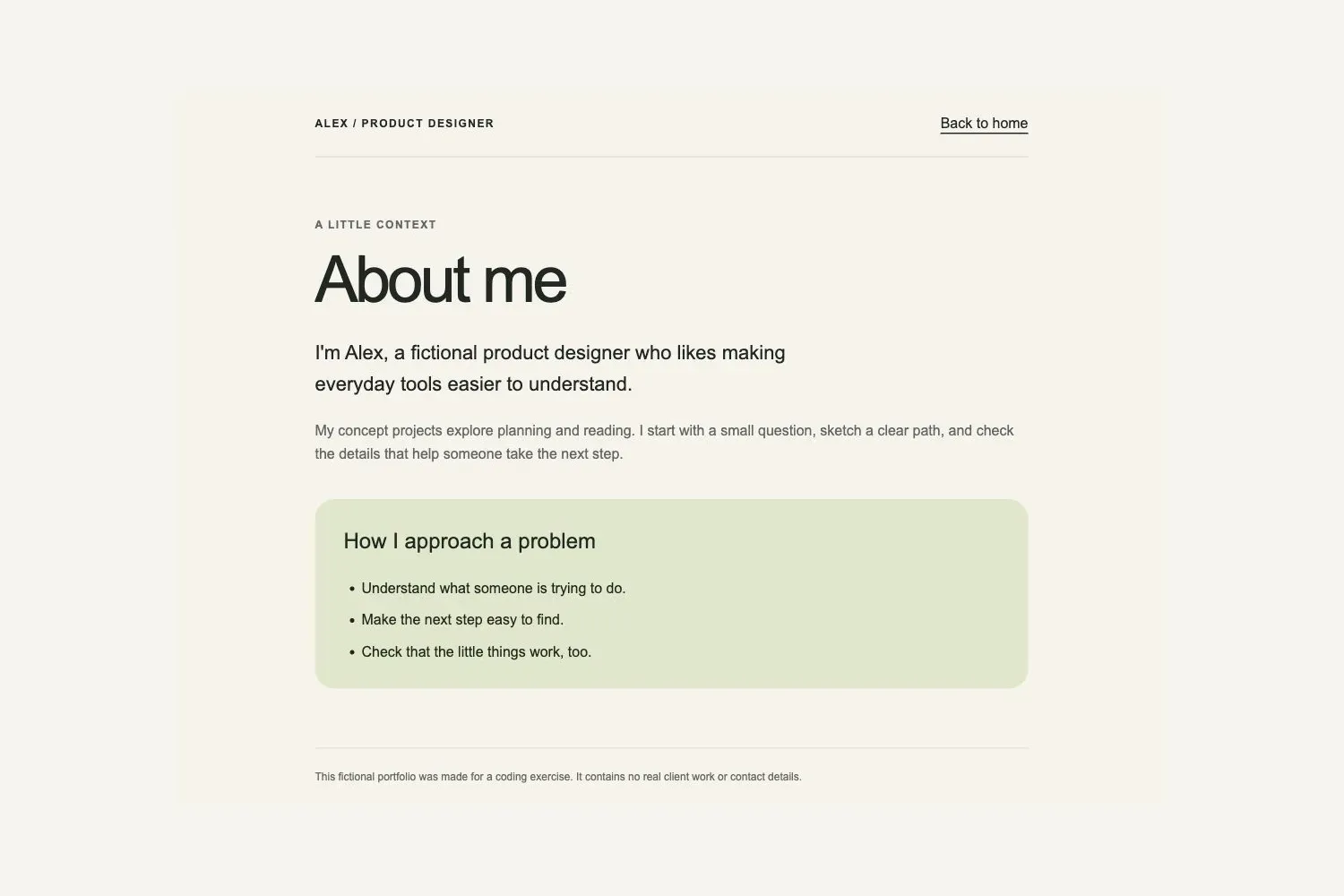
If the page still does not open, check whether the address bar shows the old about-me.html. Make sure you opened this exercise folder, not another copy. Also check for an accidental filename such as about.html.txt, and confirm that both files are in the same folder.
Use the actual click result as your test. Claude Code saying the link is fixed does not replace this step.
6. Restore the original and control the change
When you finish, open index.before.html in your editor, copy all its contents back into index.html and save. Refresh the homepage and click About me again. The original broken link should return, showing that you restored the version from before the edit.
To keep the fixed version, change that one about-me.html back to about.html and repeat the browser checks. Completing the exercise means you can explain the cause, confirm a minimal edit and restore the original.
For a real project that needs a second agent's review, you can hand over the relevant code and diff. Pachat's existing Claude Code collaboration guide covers connection and roles. This exercise can stay entirely local.
References
- Claude Code quickstart, Anthropic.
- Authentication, Anthropic.
- Configure permissions, Anthropic.
- Common workflows, Anthropic.
- Claude Code with your other agents, Pachat.