 Pachat.ai
Claude Code를 처음 쓴다면 결과를 분명히 확인할 수 있는 작은 작업으로 시작하세요. 이번에는 포트폴리오 첫 페이지의 About me 링크를 고칩니다. HTML 파일 두 개만 사용하며 웹사이트를 배포할 필요가 없습니다. 파일의 변경 내용과 브라우저 클릭 결과로 제대로 수정되었는지 판단할 수 있습니다.
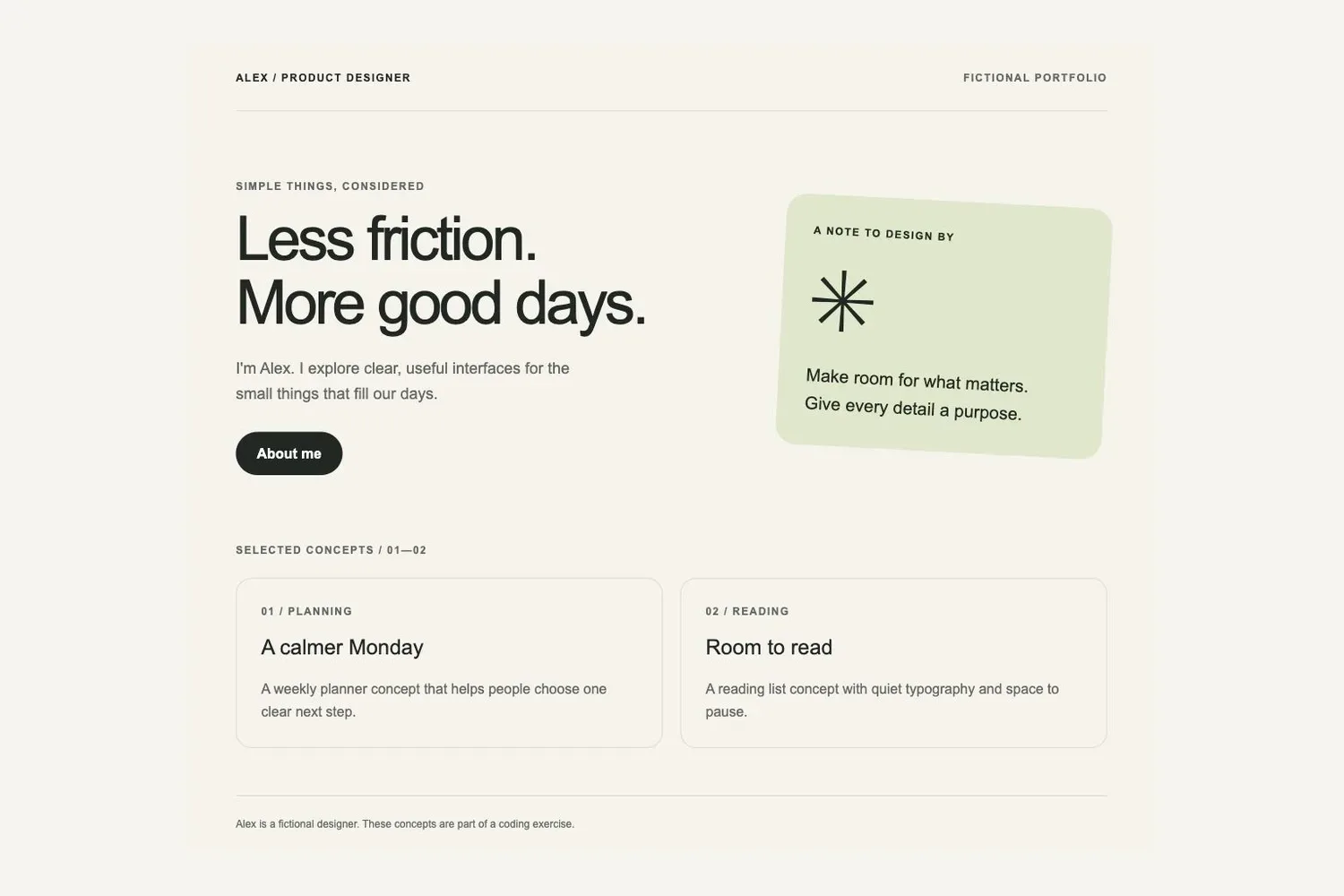
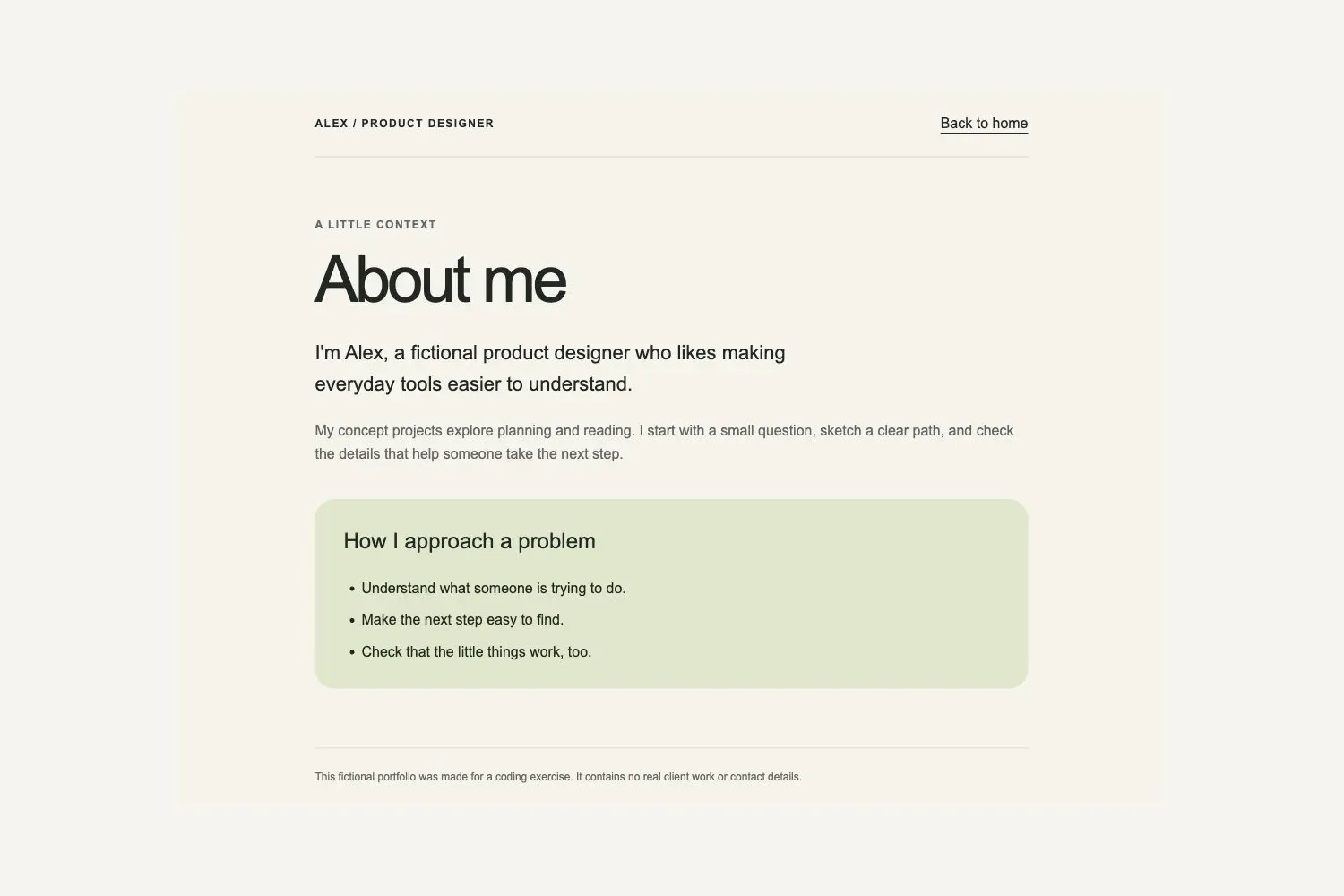
아래 메시지는 복사해서 쓸 수 있는 연습용 지시이며, 이미지는 연습 웹페이지입니다. 모델의 답변은 달라질 수 있으므로 저장된 파일과 클릭 결과를 기준으로 확인하세요.
1. 설치하고 로그인한 뒤 연습 폴더 열기
Claude Code가 설치되어 있다면 버전 확인으로 넘어가세요. 처음이라면 운영체제에 맞는 명령을 터미널에서 실행합니다. 두 방법 모두 Anthropic 공식 빠른 시작에 나온 설치 방식입니다.
macOS, Linux, WSL:
curl -fsSL https://claude.ai/install.sh | bash
Windows PowerShell:
irm https://claude.ai/install.ps1 | iex
Windows 명령은 CMD가 아닌 PowerShell에서 실행하세요. 설치가 끝나면 새 터미널을 열고 다음을 실행합니다.
claude --version
예상 결과: Claude Code 버전 번호가 표시됩니다. 명령을 찾을 수 없다는 메시지가 나오면, 먼저 공식 빠른 시작의 설치 문제 안내에 따라 해결하세요.
파일 관리자에서 claude-code-link-exercise 폴더를 만듭니다. 터미널에 cd 다음으로 폴더의 전체 경로를 입력하고, 공백이 있으면 큰따옴표로 감싸세요. 아래 예시 경로는 자신의 경로로 바꿔야 합니다.
cd "/path/to/claude-code-link-exercise" claude
처음 실행하면 브라우저 안내에 따라 Claude Code 접근 권한이 있는 계정으로 로그인하세요. 브라우저가 열리지 않으면 터미널 안내대로 로그인 링크를 복사합니다. 자세한 내용은 공식 로그인 안내에 있습니다. 세션의 작업 디렉터리가 연습 폴더인지 확인하세요.
2. 페이지 두 개를 만들고 문제 재현하기
일반 텍스트 편집기나 코드 편집기로 연습 폴더 안에 다음 두 파일을 만듭니다. 이름은 정확히 index.html, about.html로 하고 끝에 .txt가 붙지 않게 하세요. 각 코드 블록 전체를 해당 파일에 복사하고 저장합니다.
index.html:
<!doctype html> <html lang="en"> <head> <meta charset="utf-8"> <meta name="viewport" content="width=device-width, initial-scale=1"> <title>Alex — Thoughtful design</title> <style> :root { color-scheme: light; --ink: #202722; --paper: #f5f3eb; --muted: #62695f; --line: #d8dcd0; } * { box-sizing: border-box; } body { margin: 0; background: var(--paper); color: var(--ink); font-family: Arial, sans-serif; line-height: 1.6; } .wrap { max-width: 1060px; margin: auto; padding: 0 32px; } header { display: flex; justify-content: space-between; gap: 16px; padding: 28px 0; border-bottom: 1px solid var(--line); } .label { margin: 0; font-size: 12px; font-weight: 700; letter-spacing: .12em; text-transform: uppercase; } .muted { color: var(--muted); } .hero { display: grid; grid-template-columns: 1.5fr 1fr; gap: 64px; align-items: center; padding: 76px 0; } h1 { margin: 14px 0 24px; font-size: clamp(42px, 6vw, 70px); line-height: 1.04; font-weight: 500; letter-spacing: -.05em; } .intro { max-width: 420px; font-size: 18px; } a { display: inline-block; margin-top: 12px; padding: 12px 24px; background: var(--ink); color: white; border-radius: 30px; text-decoration: none; font-weight: 700; } a:hover { background: #3d5340; } a:focus-visible { outline: 3px solid #717f38; outline-offset: 5px; } .note { padding: 32px; border-radius: 24px; background: #dfe7c9; transform: rotate(3deg); } .symbol { margin: 20px 0; font-size: 100px; line-height: 1; } .note p:last-child { margin-bottom: 0; font-size: 20px; } .work { display: grid; grid-template-columns: 1fr 1fr; gap: 20px; margin: 22px 0 54px; } article { padding: 28px; border: 1px solid var(--line); border-radius: 18px; } h2 { margin: 12px 0 4px; font-size: 24px; font-weight: 500; } article p:last-child { margin-bottom: 0; } footer { padding: 22px 0; border-top: 1px solid var(--line); font-size: 12px; color: var(--muted); } @media (max-width: 650px) { .wrap { padding: 0 22px; } .hero { grid-template-columns: 1fr; gap: 36px; padding: 44px 0; } .work { grid-template-columns: 1fr; } .symbol { font-size: 72px; } } </style> </head> <body> <div class="wrap"> <header><span class="label">Alex / Product designer</span><span class="label muted">Fictional portfolio</span></header> <main> <section class="hero" aria-labelledby="intro-title"> <div><p class="label muted">Simple things, considered</p><h1 id="intro-title">Less friction.<br>More good days.</h1><p class="intro muted">I'm Alex. I explore clear, useful interfaces for the small things that fill our days.</p> <a href="about-me.html">About me</a></div> <aside class="note"><p class="label">A note to design by</p><div class="symbol" aria-hidden="true">✳</div><p>Make room for what matters.<br>Give every detail a purpose.</p></aside> </section> <p class="label muted">Selected concepts / 01—02</p> <section class="work" aria-label="Fictional design concepts"> <article><p class="label muted">01 / Planning</p><h2>A calmer Monday</h2><p class="muted">A weekly planner concept that helps people choose one clear next step.</p></article> <article><p class="label muted">02 / Reading</p><h2>Room to read</h2><p class="muted">A reading list concept with quiet typography and space to pause.</p></article> </section> </main> <footer>Alex is a fictional designer. These concepts are part of a coding exercise.</footer> </div> </body> </html>
about.html:
<!doctype html> <html lang="en"> <head> <meta charset="utf-8"> <meta name="viewport" content="width=device-width, initial-scale=1"> <title>About me — Alex</title> <style> :root { color-scheme: light; --ink: #202722; --paper: #f5f3eb; --muted: #62695f; --line: #d8dcd0; } * { box-sizing: border-box; } body { margin: 0; background: var(--paper); color: var(--ink); font-family: Arial, sans-serif; line-height: 1.6; } .wrap { max-width: 860px; margin: auto; padding: 0 32px; } header { display: flex; justify-content: space-between; gap: 16px; align-items: center; padding: 24px 0; border-bottom: 1px solid var(--line); } .label { margin: 0; font-size: 12px; font-weight: 700; letter-spacing: .12em; text-transform: uppercase; } a { color: var(--ink); text-underline-offset: 5px; } a:hover { color: #3d5340; } a:focus-visible { outline: 3px solid #717f38; outline-offset: 5px; } main { padding: 66px 0; } h1 { margin: 14px 0 26px; font-size: clamp(44px, 8vw, 72px); line-height: 1.04; font-weight: 500; letter-spacing: -.05em; } .intro { max-width: 620px; font-size: 22px; } .muted { color: var(--muted); } .card { margin-top: 38px; padding: 28px 32px; background: #dfe7c9; border-radius: 22px; } h2 { margin-top: 0; font-size: 24px; font-weight: 500; } ul { margin-bottom: 0; padding-left: 20px; } li + li { margin-top: 10px; } footer { padding: 22px 0; border-top: 1px solid var(--line); font-size: 12px; color: var(--muted); } @media (max-width: 650px) { .wrap { padding: 0 22px; } main { padding: 44px 0; } .card { padding: 24px; } } </style> </head> <body> <div class="wrap"> <header><span class="label">Alex / Product designer</span><a href="index.html">Back to home</a></header> <main> <p class="label muted">A little context</p> <h1>About me</h1> <p class="intro">I'm Alex, a fictional product designer who likes making everyday tools easier to understand.</p> <p class="muted">My concept projects explore planning and reading. I start with a small question, sketch a clear path, and check the details that help someone take the next step.</p> <section class="card" aria-labelledby="approach-title"> <h2 id="approach-title">How I approach a problem</h2> <ul><li>Understand what someone is trying to do.</li><li>Make the next step easy to find.</li><li>Check that the little things work, too.</li></ul> </section> </main> <footer>This fictional portfolio was made for a coding exercise. It contains no real client work or contact details.</footer> </div> </body> </html>
index.html을 더블클릭해 브라우저에서 연 뒤 About me를 누르세요. 첫 페이지는 about-me.html로 연결되지만 실제 파일은 about.html이므로 원하는 소개 페이지가 열리지 않습니다. 오류 문구는 브라우저마다 다를 수 있습니다. 핵심은 파일 이름이 서로 다르다는 점입니다.
파일 관리자에서 index.html을 복사하고 복사본 이름을 index.before.html로 지정하세요. 비교와 복구에 사용할 원본 백업입니다. 이 연습에는 Git 설치가 필요하지 않습니다.
3. 수정 없이 원인 조사 요청하기
열어 둔 Claude Code 세션에 다음 메시지를 보내세요.
현재 연습 폴더의 index.html과 about.html만 확인하고 파일은 수정하지 마세요. 첫 페이지의 About me 링크가 열리지 않습니다. href, 실제로 존재하는 대상 파일, 둘의 차이를 알려 주세요. index.before.html은 원본 백업입니다. 수정하지 말고, 고쳐야 할 페이지로 취급하지도 마세요. 마지막으로 변경을 권하는 한 곳을 알려 주세요.
확인할 답변: 첫 페이지에는 about-me.html이 적혀 있고 실제 파일은 about.html이라는 점을 짚어야 합니다. 수정 제안도 첫 페이지 링크의 href 한 곳으로 제한되어야 합니다.
about-me.html을 새로 만들거나 페이지 전체를 다시 쓰거나 스타일을 변경하겠다면 먼저 범위를 바로잡으세요. 올바른 대상 페이지가 이미 있으므로 잘못된 주소에 맞춰 새 페이지를 만들 필요는 없습니다. 조사한 뒤 수정 범위를 정하는 순서는 Anthropic의 오류 수정 작업 흐름과도 맞습니다.
4. 링크 하나만 고치고 차이 확인하기
원인을 확인한 다음 이어서 보냅니다.
index.html에서 About me 링크의 href만 about-me.html에서 about.html로 바꾸세요. 링크 문구, 스타일, 다른 본문, about.html, index.before.html은 수정하지 마세요. 저장 후 index.before.html과 index.html을 비교해 실제 파일 차이와 수정한 파일 목록을 보여 주세요. 웹페이지를 게시하거나 배포하지 마세요.
권한 요청이 나오면 대상 파일과 동작이 지시한 범위에 맞는지 확인하세요. 요청 표시 여부는 현재 권한 모드와 설정에 따라 달라집니다. 확인창이 없었다고 수정도 없었다고 판단하면 안 됩니다.
핵심 차이는 대상 파일 이름 하나여야 합니다.
- <a href="about-me.html">About me</a></div> + <a href="about.html">About me</a></div>
이것이 이번 연습에서 허용한 변경입니다. 실제 diff에는 줄 번호와 수정하지 않은 주변 코드가 함께 나올 수 있습니다. 편집기로 index.html을 열고 href를 검색해 저장된 값을 확인하세요. 백업에는 이전 값이 남아 있는지도 확인합니다. 페이지 전체나 다른 파일까지 바뀌었다면 아직 “한 곳만 수정” 조건을 만족하지 못한 것입니다.
5. 브라우저에서 결과 확인하기
첫 페이지로 돌아가 새로고침하거나 연습 폴더의 index.html을 다시 더블클릭하세요. About me를 누른 뒤 각 항목을 확인합니다.
| 확인 항목 | 예상 결과 |
|---|---|
| 첫 페이지 링크 클릭 | 로컬 about.html이 열림 |
| 페이지 내용 확인 | 파일을 찾을 수 없다는 오류 대신 About me 제목이 표시됨 |
| 첫 페이지로 돌아가기 | Back to home을 누르면 index.html이 열림 |
| 수정 범위 확인 | index.html의 대상 주소만 바뀌고 백업과 소개 페이지는 그대로임 |
여전히 열리지 않으면 주소창에 이전의 about-me.html이 남아 있는지 보세요. 다른 복사본이 아닌 이 연습 폴더를 열었는지도 확인하세요. 파일이 about.html.txt로 저장되지 않았는지, 두 파일이 같은 폴더에 있는지도 살펴봅니다.
판단 기준은 실제 클릭 결과입니다. Claude Code가 “수정했습니다”라고 답하는 것으로 이 단계를 대신할 수는 없습니다.
6. 원래 상태로 복구하며 변경 관리하기
연습을 마치면 편집기에서 index.before.html을 열고 전체 내용을 index.html에 다시 복사해 저장하세요. 첫 페이지를 새로고침하고 About me를 누르면 원래의 깨진 링크가 다시 나타나야 합니다. 수정 전 상태를 복구했다는 뜻입니다.
수정된 상태를 유지하려면 해당 한 곳의 about-me.html을 다시 about.html로 바꾸고 앞 절의 브라우저 확인을 반복하세요. 원인을 설명하고, 최소 변경을 확인하고, 원래 상태로 되돌릴 수 있으면 이 연습을 완료한 것입니다.
실제 프로젝트에서 다른 에이전트의 검토가 필요할 때는 관련 코드와 diff를 전달할 수 있습니다. 연결과 역할 분담은 기존 Pachat Claude Code 협업 안내에 있습니다. 이번 연습은 로컬에서 끝내면 됩니다.
참고 자료
- Claude Code 빠른 시작, Anthropic(영어).
- 로그인과 인증, Anthropic(영어).
- 권한 설정, Anthropic(영어).
- 일반적인 작업 흐름, Anthropic(영어).
- Claude Code와 다른 에이전트의 협업, Pachat(영어).