 Pachat.ai

Claude Code Agent Teams: How to Set Up and Use Them
Updated 2026-11
TL;DR: Claude Code agent teams let one Claude Code session act as a team lead that creates a task list, spawns teammates and coordinates them, while each teammate works in its own context window and can message the others. The feature is experimental and off by default. Turn it on with one setting, describe the team you want in a prompt, and you can talk to any teammate directly.
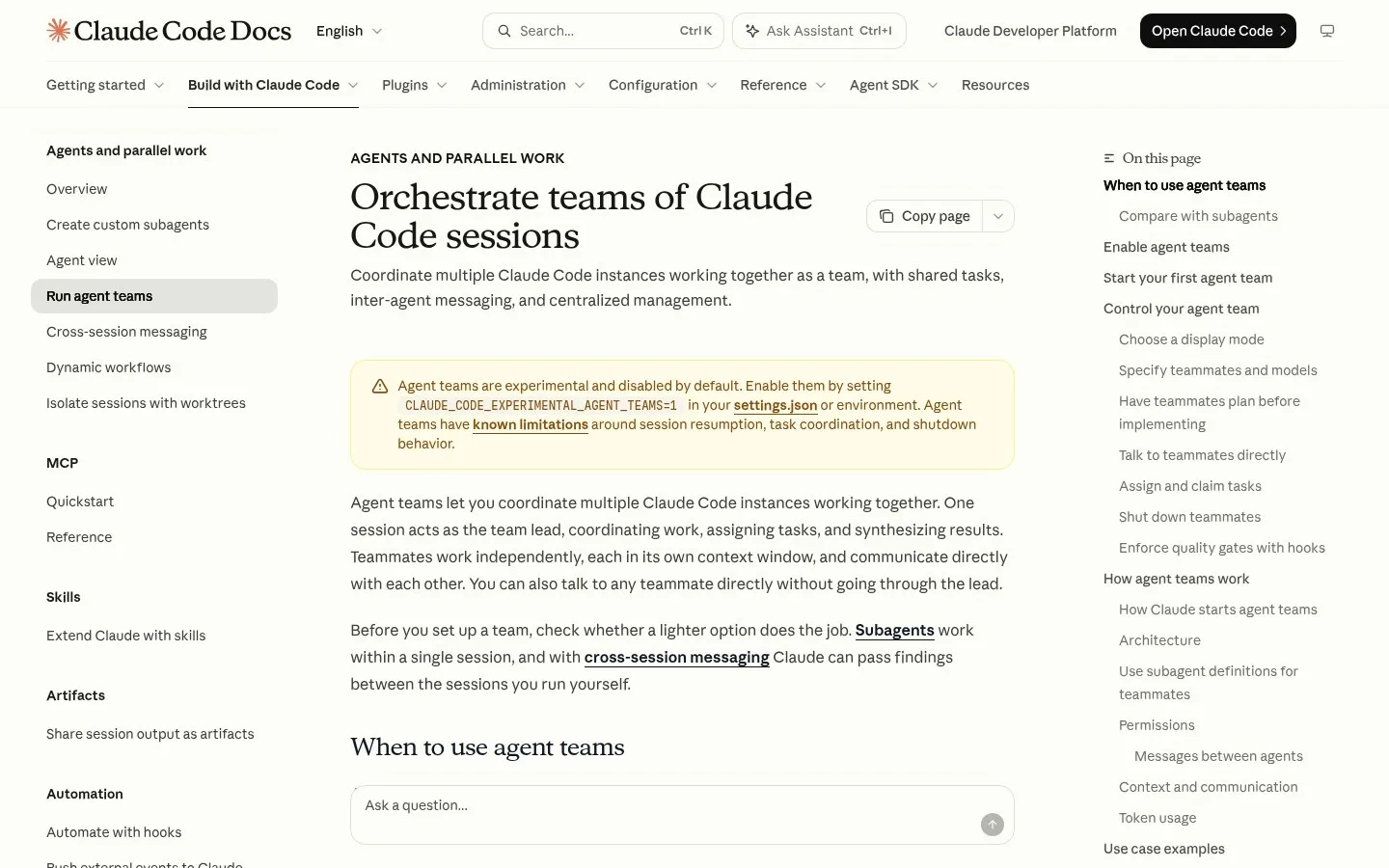
Screenshot of the official Claude Code docs page on agent teams.
What Are Claude Code Agent Teams?
Claude Code agent teams are a feature that lets you coordinate several Claude Code instances working together on one project. Anthropic released them in February 2026, and in November 2026 the docs still mark them as experimental and disabled by default. One session becomes the lead and the others become teammates, so 1 prompt can start a small crew that plans, splits the work and reports back.
This allows you to build a complete team of agents that works within Claude Code completely like a normal team would.
So you have a task list and you can assign teammates task and they go ahead and work on it. Instead of one Claude code instance handling everything, you can now deploy multiple specialized agents on a single project. Each one has a different role, each one has different skills, and they all work together without stepping on each other's toes.
This is the difference between hiring one freelancer versus building an actual team.
with Claude agent teams, you can run multiple different agents at the same time.
One agent gets overwhelmed, multiple agents divide and conquer, and the lead agent makes sure nobody's duplicating work or creating conflicts.
How the Team Lead Works
The team lead is the main conversation, and it is the part of an agent team that turns your prompt into work. In the February 2026 demos, the lead read the code base, wrote a task list and spawned 3 agents in parallel within a few minutes. The docs describe the same role: the lead coordinates work, assigns tasks and synthesizes results, while teammates work independently and communicate directly with each other.
The team lead is the one that is going to coordinate all the agents between all of them.
It's not just another worker. It's the coordinator.
It sees the whole project. It knows what each teammate is doing. It spots conflicts before they happen. It reassigns tasks when priorities change.
You're basically prompting a project manager who then manages the execution team.
The lead creates a master task list. It assigns initial tasks based on dependencies. So one specialist starts first because everyone else needs their output. When one specialist finishes their work, it marks that task complete. The next developer sees it's ready and picks up the next task. No lag, no confusion, no asking for updates.
How to Turn On Claude Code Agent Teams
Turning on agent teams is a 1-line change, because the feature is still an experiment that you have to opt into. As of November 2026 the official docs say to set the environment variable CLAUDE_CODE_EXPERIMENTAL_AGENT_TEAMS to 1, either in your shell or in the env block of settings.json. Once that's set, you're ready to spawn teams.
- Open your Claude settings file. Step No. 1, just simply edit your Claude Settings file. So this exists in your main folder under users and Claude, and you need to select settings.json.
- Add the line
"CLAUDE_CODE_EXPERIMENTAL_AGENT_TEAMS": "1"insideenv. This simply says that this is an experimental feature and you are okay to go ahead and test this. - Start Claude Code and describe the team you want in plain language.
- Watch the lead create the task list and spawn the teammates.
The setup takes literally two minutes. You don't prompt each agent individually. You prompt the lead and you prompt it like you're briefing a team lead at your company.
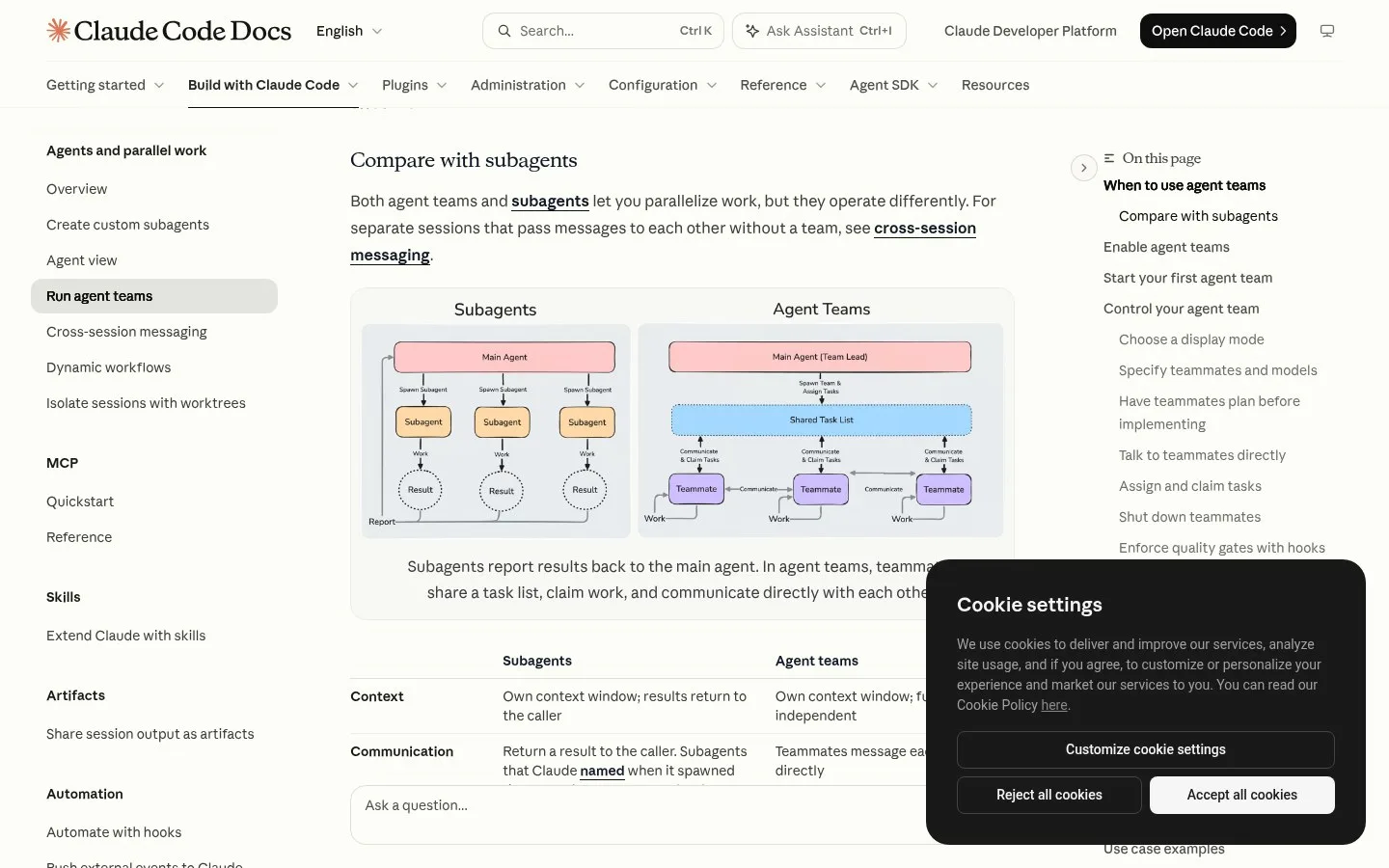
Screenshot of the agent teams page in the official Claude Code docs.
Your First Agent Team Prompt
A first agent team prompt is a short brief that names the goal, the roles and what done looks like. A demo from February 2026 used 3 roles on one feature: a PRD agent, a UI designer and a blog writer. You explain the project. You explain the goals. You explain what success looks like. Then you tell it what kind of specialist you need.
build a team of two agents to create a calculator.
The PRD agent technically creates product requirement documentation based on your input, then a UI designer, which actually creates the UI mockup, and a blog writer. So every time you add a new feature, a new blog is written. As you can see, the agent has already started looking for understanding the code base and then setting up a team.
And you can see here it has started spinning up three agents in parallel and assigning them this. The best part is that it is all happening in parallel. Another demo used the same pattern: you say "create me an agent team" and then you have a front end dev, a back end dev, and a QA. It's setting up the task dependencies and it's assigning owners. And now it's spawning those agents.
Being extremely clear on how your team lead also needs to perform is the way to create agent teams. It should assign 6 tasks, be very clear and should ask before shutting itself down. Then define enough constraint: what needs to be done in which place, and how the task needs to be completed.
Agent Teams vs Subagents
Agent teams and subagents are two ways to split work in Claude Code, and the difference is who talks to whom. In the November 2026 docs, subagents report results back to the main agent only, while teammates share 1 task list, claim work and message each other directly. That makes subagents better for focused tasks and teams better for work that needs discussion.
The most important difference between subagents and agent team is that in the subagent, you are technically dependent upon every single agent to complete the work and come back to the main agent
So that technically makes you do a lot of management of agents. It works pretty well for simple tasks, but not if you are trying to do multiple things at the same time. At that time, you are still going to be a bottleneck with the main agent being there.
In an agent team, the main conversation becomes your team lead. It created the task list, it assigned them the task and now it allows you to talk to them separately. It doesn't have to be Agent 1 hands off to Agent 2 and then Agent 2 hands off to Agent 3, because that honestly might not even call for an agent team. Agent teams work together in parallel and need to communicate throughout.
How to Talk to Each Teammate
Talking to a teammate directly is one of the main reasons to use an agent team instead of one long session. Since the February 2026 release you can message any of the teammates without going through the lead, and the docs list 2 display modes for it. In-process mode works in any terminal, and split panes need tmux or iTerm2.
One of the value props of agent teams is that you can individually message a sub agent if you want to.
With Claude Code running in a tmux terminal, the front end dev gets created right here. And this is the blue agent. There's another one right here, which is the back end dev. And this is the green agent. And there you go: the QA agent, which is the yellow one.
You can very clearly see what each of these agents is doing, which is super cool.
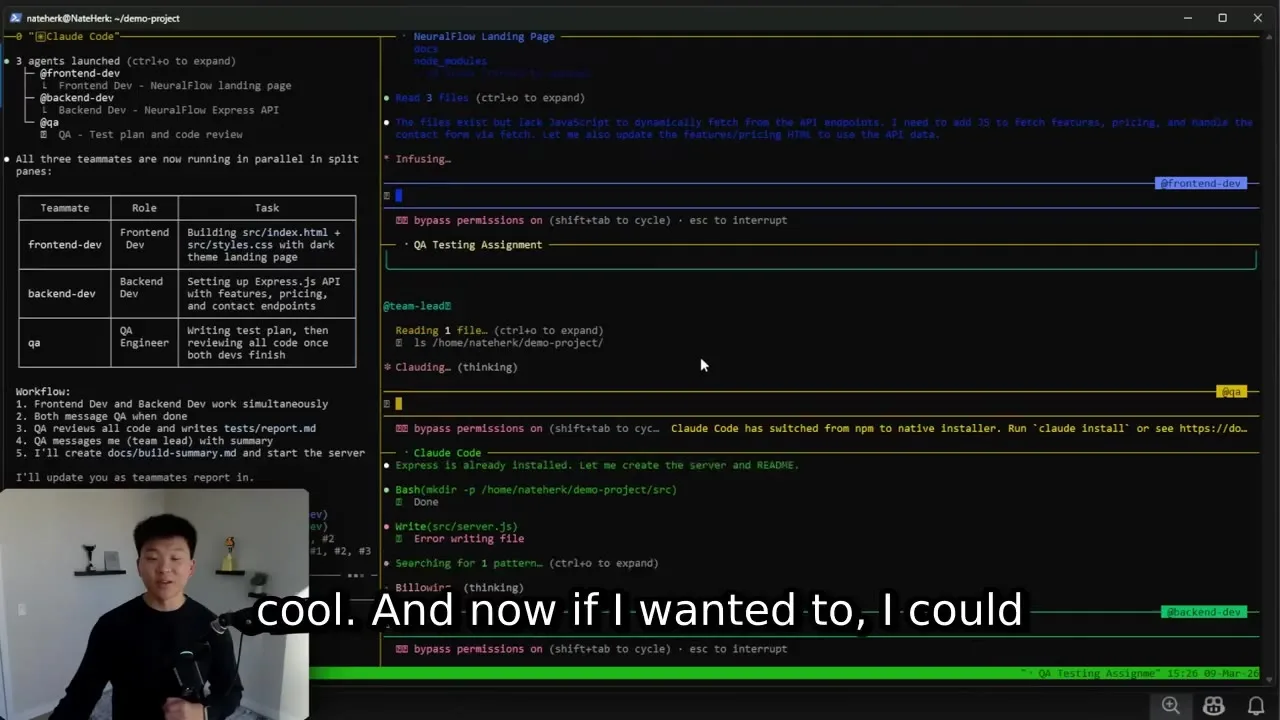
Frame from a demo: a lead and three teammates in separate tmux panes.
You could come up here and you could talk to the front end dev. You could approve things or you could give it more info. In the in-process view, you can go each of these agents separately: for example, go to the blog writer and say create two more blogs on the 401k feature, and this separately goes only and only to the blog writer. So you can see every other agent is idle.
When the work is done, you can simply ask the team lead to shut down the agent team. When you shut it down, it simply tells the whole team: job done, bye, bye. And you can see all the three teammates have been shut down.
Three Rules for a Good Agent Team
A good agent team is one that follows 3 simple rules, and they matter more than the size of the team. These rules come from a September 2026 walkthrough and match the official advice to give each teammate separate files. The first one is that each of these agents has their own territory. So they should have their own file and they should be working on their own deliverables.
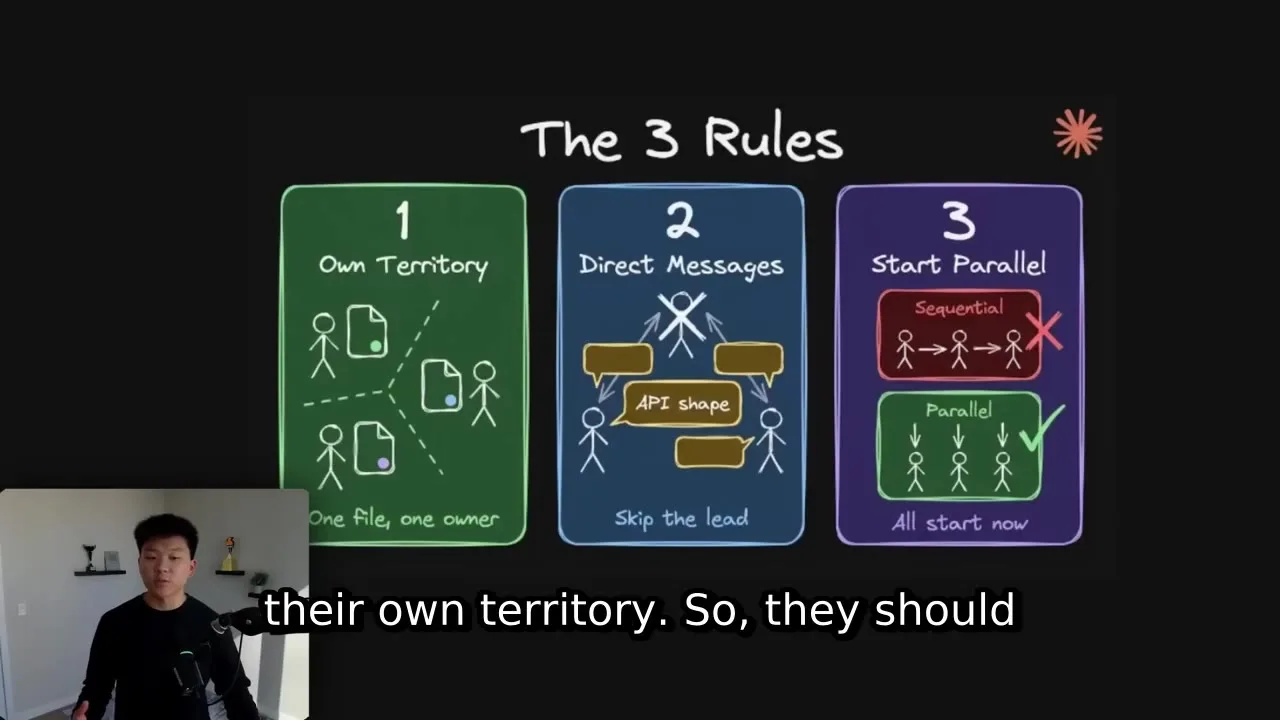
Frame from a demo slide with the three rules.
They can send them across and they can communicate, but they should only really all be editing their own thing. The second thing is, once again, direct messaging. They can talk to each other. They don't have to use the middleman of the main session. And then third piece is that they can be working at the same time.
Limits of Claude Code Agent Teams
The limits of Claude Code agent teams are short and clear, and most of them come from the feature still being experimental. Knowing them before your first big run saves you a confused restart. The November 2026 docs name known issues with session resumption, task coordination and shutdown, and they allow 1 team per session with no nested teams. The lead also stays fixed for the life of the session.
- You can run one team per session, and teammates cannot start their own teams.
- The lead you start with stays the lead until the session ends.
- Teammates start with the lead's permission settings.
- Resuming a session does not always bring back in-process teammates.
Running several sessions side by side is not new. One demo ran 6 separate Claude sessions in parallel to build a full sales CRM for one company, and it ended like this:
And it all works in one prompt, one prompt with one or two errors at the end.
That was six parallel sessions, not the official feature. Agent teams add the lead, the shared task list and direct messages on top. A great use case is building the front end and the back end of a feature very quickly in the same agent team. The official docs list similar fits: research and review, new modules or features, debugging with competing ideas and changes that cross several layers.
Use Claude Code Agent Teams With Pachat
An agent team is several Claude Code sessions working inside your project, and Pachat is where you can put different AIs next to each other. Pachat is a web product at pachat.ai, described on the site as "Different personal AI agents, in one group chat."
- Let your Claude Code agent team finish the task and write up its result.
- Open pachat.ai and put your Claude, Grok Bot, Muse and ChatGPT dots in one group chat.
- Ask the group about the plan or the result. They check each other's facts and argue it out, then you make the call.
To see how Claude Code is described next to other agents, read the Claude Code agent page, the Codex and Claude Code use case and the guide to your first Claude Code task.
FAQ
What are Claude Code agent teams?
Claude Code agent teams are a feature that coordinates several Claude Code instances on one project. One session is the team lead, which creates a task list, assigns work and combines results. Each teammate works in its own context window and can message the others directly. The feature arrived in February 2026 and is still experimental in November 2026, so it is off until you turn it on.
How do I enable agent teams in Claude Code?
Set the environment variable CLAUDE_CODE_EXPERIMENTAL_AGENT_TEAMS to 1. You can export it in your shell or add it to the env block of your settings.json file. Then start Claude Code and ask it to create an agent team with the roles you want. The docs in November 2026 describe this 1 setting as the only switch you need before your first team.
How are agent teams different from subagents?
Subagents run inside one session and report their results back to the main agent only. Teammates in an agent team share a task list, claim work and message each other directly, and you can talk to any of them yourself. The docs in 2026 suggest subagents for focused tasks where only the result matters, and agent teams for complex work that needs discussion between 2 or more workers.
Can I talk to one teammate without going through the lead?
Yes. In the in-process display mode, use the arrow keys to pick a teammate and type a message to it, and in split-pane mode you click into that teammate's pane. Split panes need tmux or iTerm2 as of November 2026. A message sent this way goes only to that 1 teammate, while the others stay idle or keep working on their own tasks.
What kind of work suits an agent team?
Agent teams fit work that can be split into parts that run at the same time and still need to talk. The docs in 2026 list 4 strong cases: research and review, new modules or features, debugging with competing ideas, and changes that cross the front end, back end and tests. For a short, single-file change, one session or one subagent is usually enough.
Does Pachat run Claude Code agent teams?
No, they do different jobs. Agent teams are Claude Code sessions inside your own project. Pachat is a web product where you put your Claude, Grok Bot, Muse and ChatGPT dots in one group chat, and they check each other's facts and argue it out, then you make the call. In 2026 you can use both: let a team finish a task, then bring the result to pachat.ai.
Ready to put different AIs in one group chat? Start at pachat.ai.
References
- Claude Code Docs, "Orchestrate teams of Claude Code sessions," fetched 2026-11-18: https://code.claude.com/docs/en/agent-teams
- @akshatbahety, 2026-02-21: https://x.com/akshatbahety/status/2025269286357618991
- @catmanyau, 2026-09-16: https://x.com/catmanyau/status/2100057764995174565
- @danhergir, 2026-02-25: https://x.com/danhergir/status/2026699963586245088
- @SEOMastery2026, 2026-02-09: https://x.com/SEOMastery2026/status/2020907067578646964
- @JulianGoldieSEO, 2026-02-14: https://x.com/JulianGoldieSEO/status/2022603591199133779
- @rick_boers, 2026-02-07: https://x.com/rick_boers/status/2020154972936220735